So aktivieren Sie Ihre EPLAN Schematic Solution-Lizenz
Nach dem Kauf einer oder mehrerer Lizenzen für EPLAN Schematic Solution erhalten Sie eine E-Mail mit den Lizenzschlüsseln. Dies sind Ihre digitalen Lizenzen, die Sie direkt in Ihrem MyFesto-Konto aktivieren können.
Aktivieren Sie Ihre Lizenz für EPLAN Schematic Solution
1. Erstellen Sie ein EPLAN Schematic Solution-Projekt.
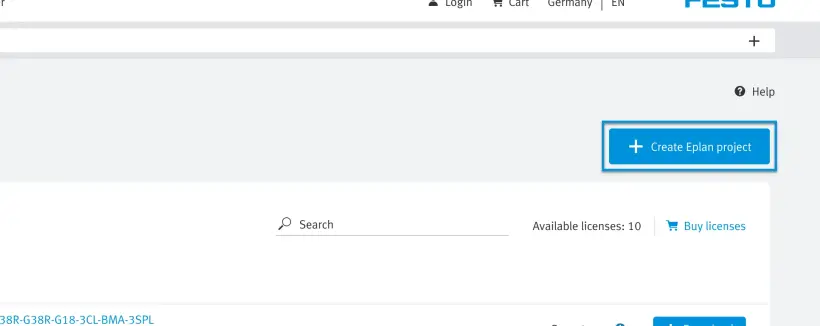
2.1 Verwenden Sie entweder Ihre bestehenden Lizenzen, die mit Ihrem Konto verknüpft sind.
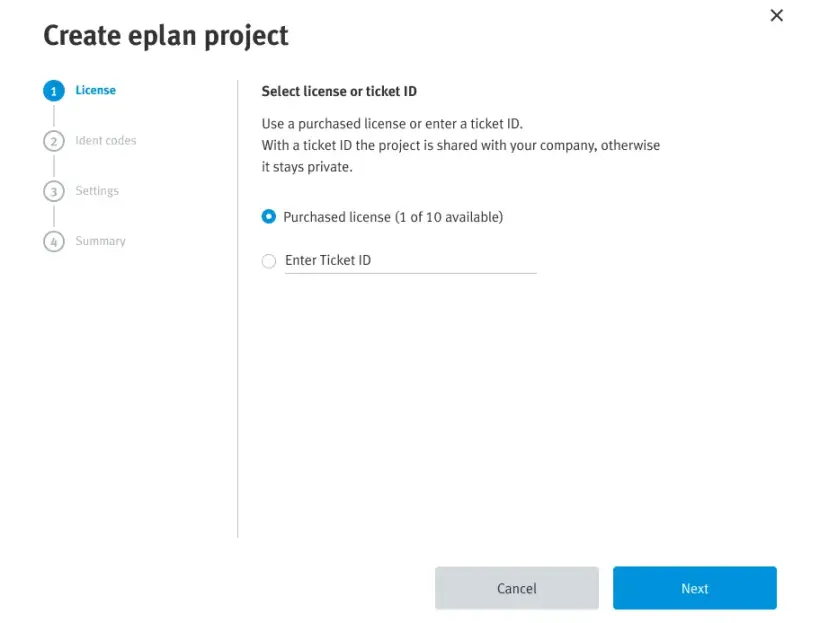
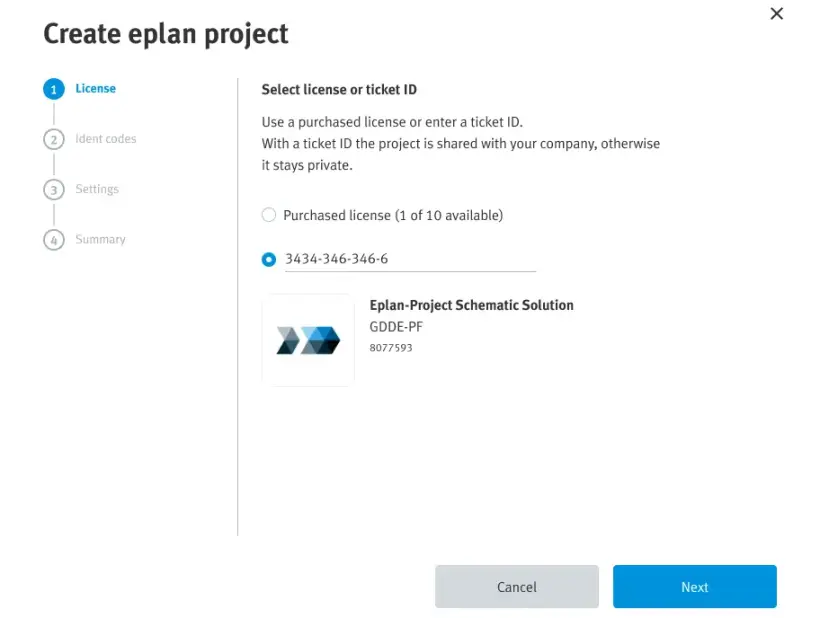
2.2 Oder geben Sie den Lizenzschlüssel aus der E-Mail ein, die Sie erhalten haben.
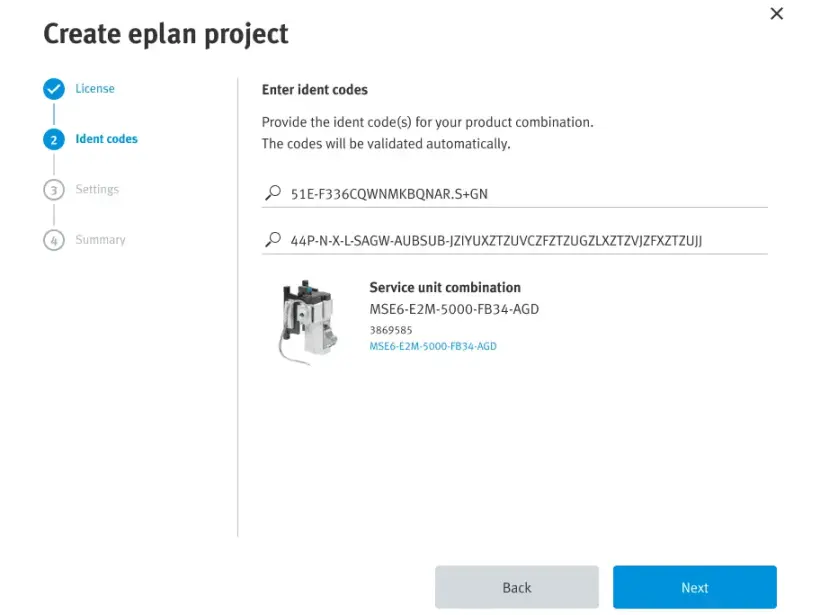
3. Geben Sie den Ident-Code der Produktkombination ein.
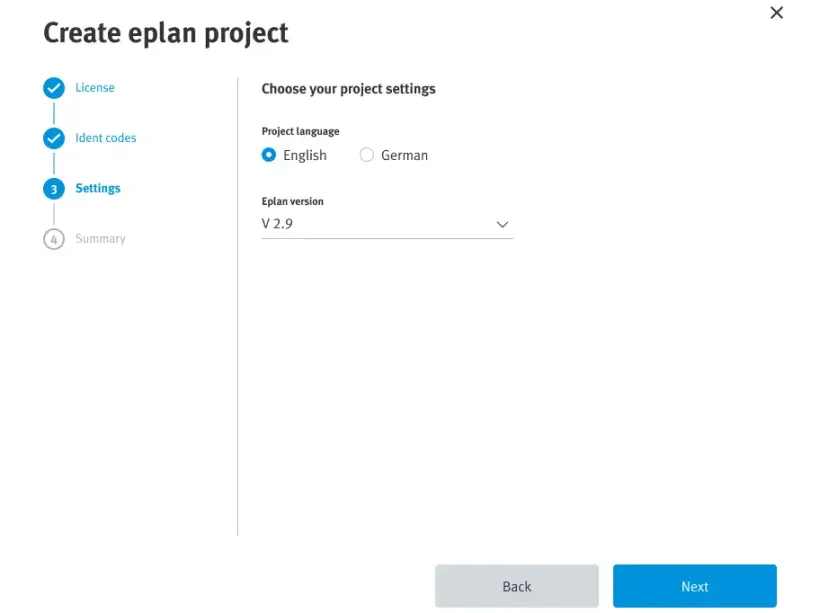
4. Wählen Sie die Sprache und die Version.
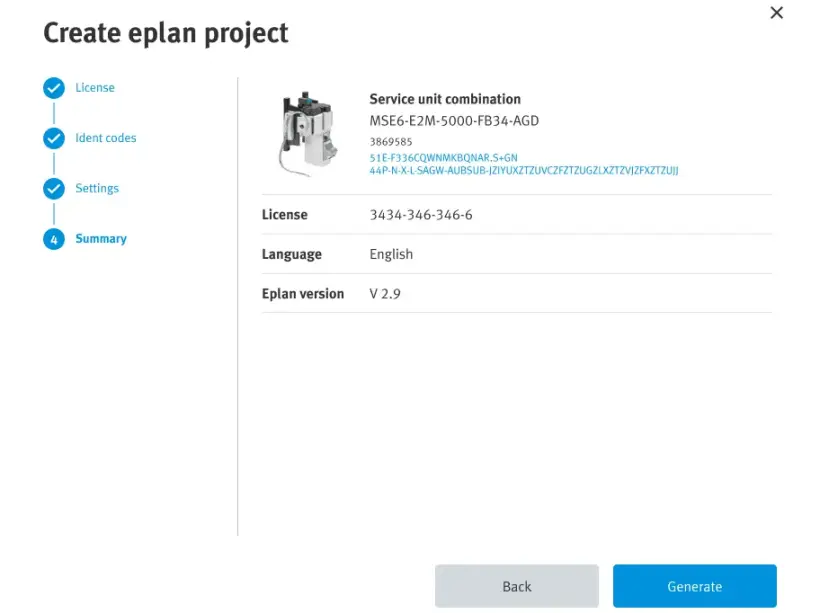
5. Überprüfen Sie die Zusammenfassung Ihres EPLAN Schematic Solution-Projekts.
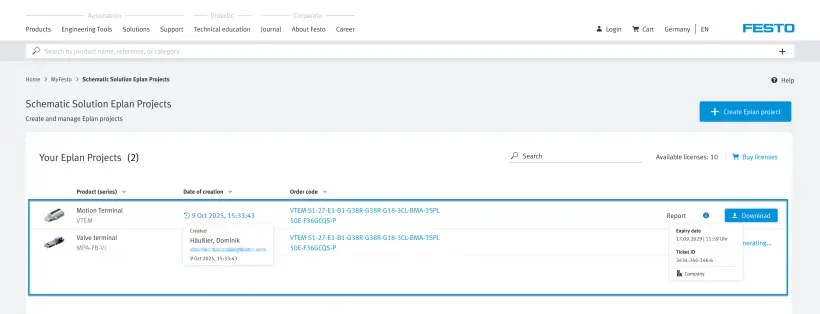
6. Wählen Sie Ihr Projekt aus und laden Sie es herunter.
So aktivieren Sie Ihre Festo LX-Lizenz
Diese Anleitung führt Sie Schritt für Schritt durch die Ersteinrichtung von Festo LX. Hier erfahren Sie mehr über die Erstellung Ihres Kontos, die Aktivierung einer Lizenz oder die wichtigsten Funktionen.
Für weitere Informationen empfehlen wir Ihnen, einen Blick auf unsere Kurse.
Wir bieten 2 Kurse an:
Erstellen Sie ein Konto bei Festo LX.
1. Gehen Sie zu
2. Verwalten Sie die Cookie-Einstellungen.
3. Ändern Sie gegebenenfalls die Sprache des Festo LX-Portals, da diese als Grundlage für die nächsten Schritte dient.

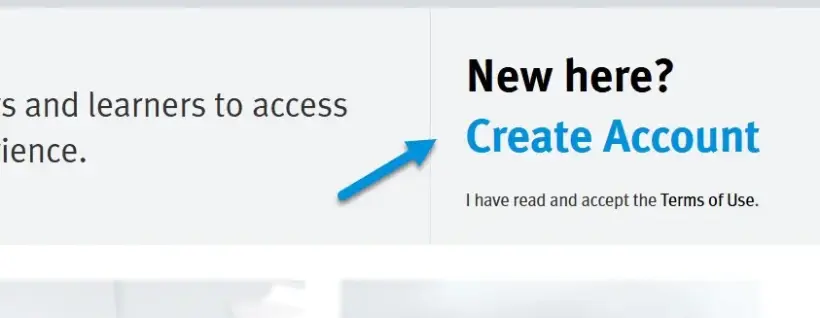
4. Klicken Sie oben rechts auf „Create Account“.
Wenn Sie bereits ein Konto für eine andere Festo Anwendung, Software oder Website haben, können Sie dieses Konto auch für Festo LX verwenden.
Wenn Sie unsere Single-Sign-On-Option erworben haben, können Sie Ihre E-Mail-Adresse verwenden, ohne ein neues Konto erstellen zu müssen.
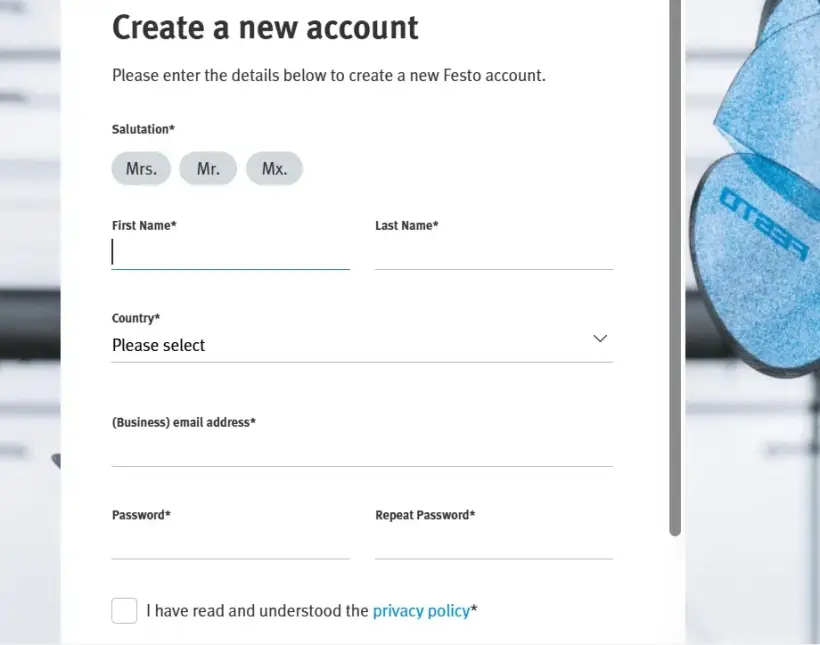
5. Geben Sie alle erforderlichen Informationen ein, um Ihr Konto zu erstellen.
6. Sobald Sie sich registriert haben, erhalten Sie eine E-Mail, mit der Sie die Einrichtung Ihres Kontos abschließen können. Falls Sie die E-Mail nicht erhalten haben, überprüfen Sie bitte Ihren Spam-Ordner.
7. Melden Sie sich mit Ihren Zugangsdaten bei Festo LX an.
Aktivieren Sie Ihre Festo LX-Lizenz.
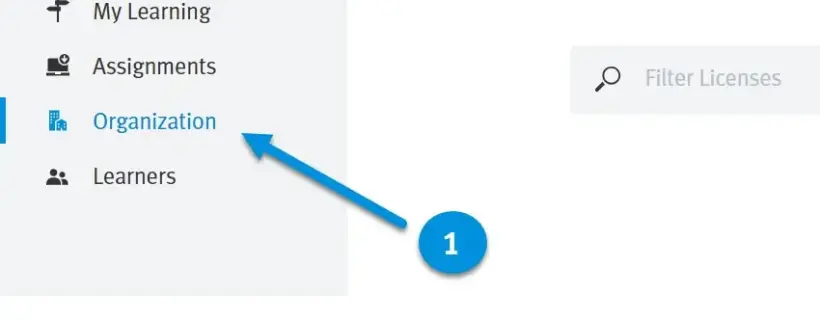
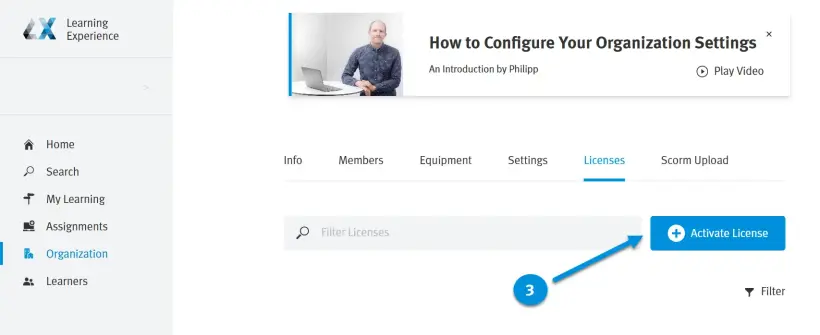
1. Klicken Sie im Hauptmenü auf „Organization“.
2. Wechseln Sie zur Registerkarte „Licenses“.
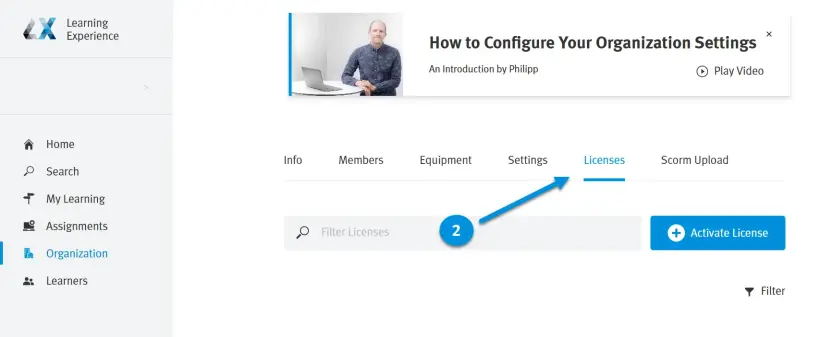
3. Klicken Sie auf „Activate License“.
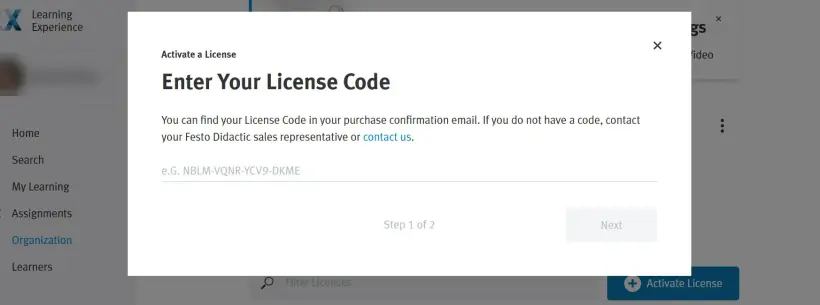
4. Geben Sie Ihren Lizenzcode ein und klicken Sie auf „Next“, um fortzufahren.
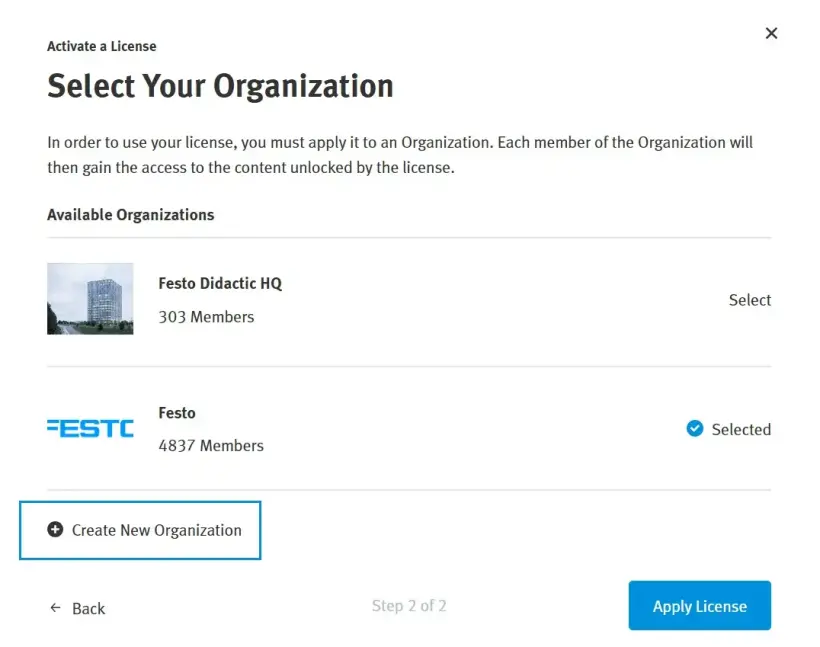
5. Klicken Sie auf „New Organization“.
Wenn Sie bereits eine Organisation in Festo LX haben, können Sie Ihre Lizenz auch in einer bestehenden Organisation aktivieren, z. B. um eine Lizenz zu verlängern.
Falls Sie von Festo im Rahmen einer Demo in eine Festo LX-Organisation eingeladen wurden, erstellen Sie bitte eine eigene neue Organisation.
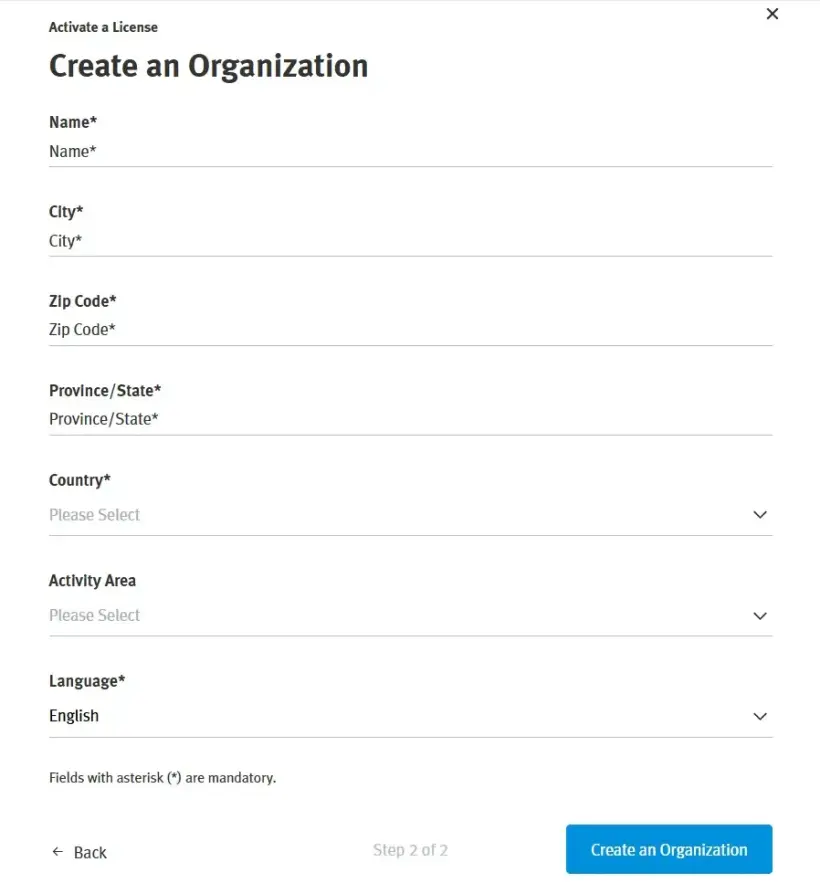
6. Geben Sie bei der Erstellung einer neuen Organisation die Daten für Ihre Organisation ein.
Informationen zu Lizenzen
Auf dieser Seite erhalten Sie einen Überblick über alle verfügbaren Lizenzen in Ihrer Festo LX-Organisation. Dies umfasst die Lizenzdauer und die Anzahl der verfügbaren Benutzer.
Die Lizenzen können sich auf Festo LX beziehen, aber auch auf andere Produkte, die in Festo LX integriert sind. zum Beispiel FluidSIM 365 oder BMC SIM.
Weitere Informationen zu einer Lizenz erhalten Sie, indem Sie auf die drei Punkte (unter „More“) klicken.
So aktivieren Sie Ihre FluidDraw-Lizenz.
Nach dem Kauf einer oder mehrerer FluidDraw365-Lizenzen erhalten Sie eine E-Mail mit dem Lizenzschlüssel („ticket ID“), der direkt in FluidDraw aktiviert werden kann.
Gehen Sie zu https://www.festo.com/fluiddraw und laden Sie Ihr FluidDraw-Installationsprogramm herunter.
Der Lizenzschlüssel, den Sie nach dem Kauf vom Lizenzgeber erhalten haben, stellt Ihre digitalen Lizenzen für FluidDraw dar. Sie können diese digitalen Lizenzen nun entweder in einen Lizenzserver oder lokal auf Ihren PC importieren. Dazu benötigen Sie eine Internetverbindung.
Unter der Registerkarte „User documentation“ finden Sie eine ausführlichere Beschreibung des Installations- und Lizenzaktivierungsprozesses. Dies wird insbesondere dann empfohlen, wenn Sie Ihren eigenen Netzwerklizenzserver einrichten.
Aktivierung einer Lizenz auf einem Einzel-PC
1. Falls Sie dies noch nicht getan haben, laden Sie das Installationsprogramm für FluidDraw aus unserem Download-Bereich herunter.
2. Installieren und starten Sie FluidDraw auf dem PC.
3. FluidDraw sucht beim Start im Netzwerk nach verfügbaren Lizenzservern.
Wird keine Lizenz gefunden, erscheint ein Dialogfeld mit einer entsprechenden Meldung. Klicken Sie in diesem Dialogfeld auf „Activate license...“, um den Aktivierungsassistenten zu starten.
4. Sie können nun Ihren Lizenzschlüssel („Ticket ID“) im Aktivierungsassistenten eingeben.
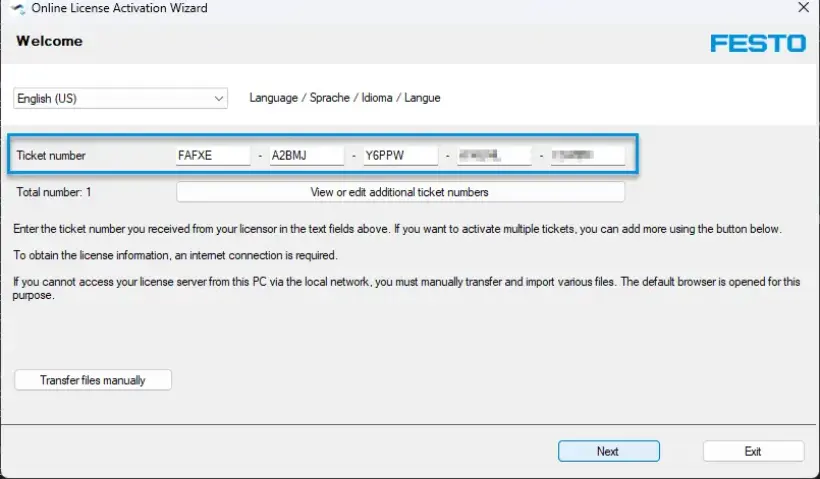
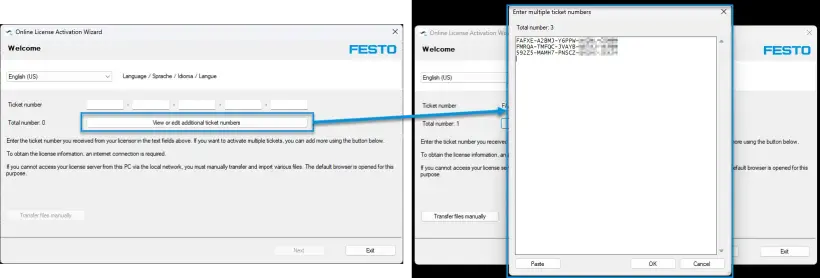
5. Wenn Sie mehrere Lizenzschlüssel haben, die Sie gleichzeitig eingeben möchten, klicken Sie auf „View or edit additional ticket numbers“, um alle Lizenzschlüssel gleichzeitig einzufügen.
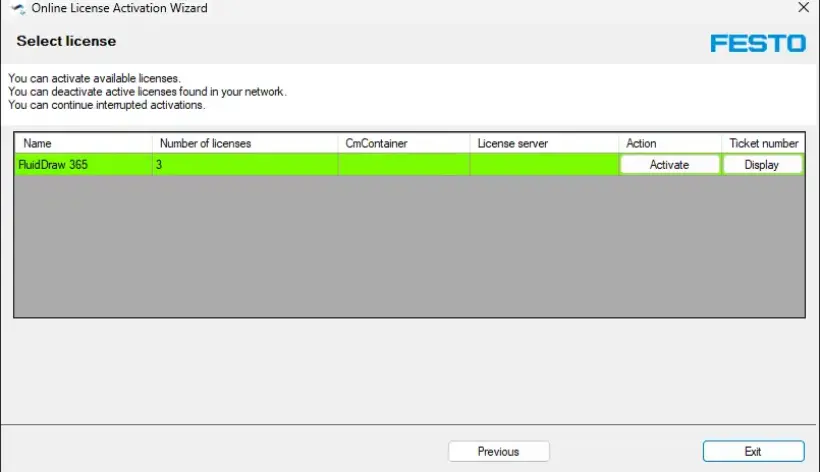
6. Befolgen Sie die Schritte des Assistenten, um die Lizenz auf Ihrem PC zu aktivieren.
So aktivieren Sie Ihre AX Controls-Lizenz
Es gibt 2 Möglichkeiten, Ihre Lizenzen zu aktivieren:
Dies ist die bevorzugte und bequemere Methode.
Voraussetzungen:
- MyFesto-Konto Erworbene Lizenzen mit der entsprechenden Kundennummer Das Konto muss mit der Kundennummer verknüpft sein.
- PC mit der Festo Automation Suite sowie einer Internetverbindung und einer Verbindung zu CEPE.
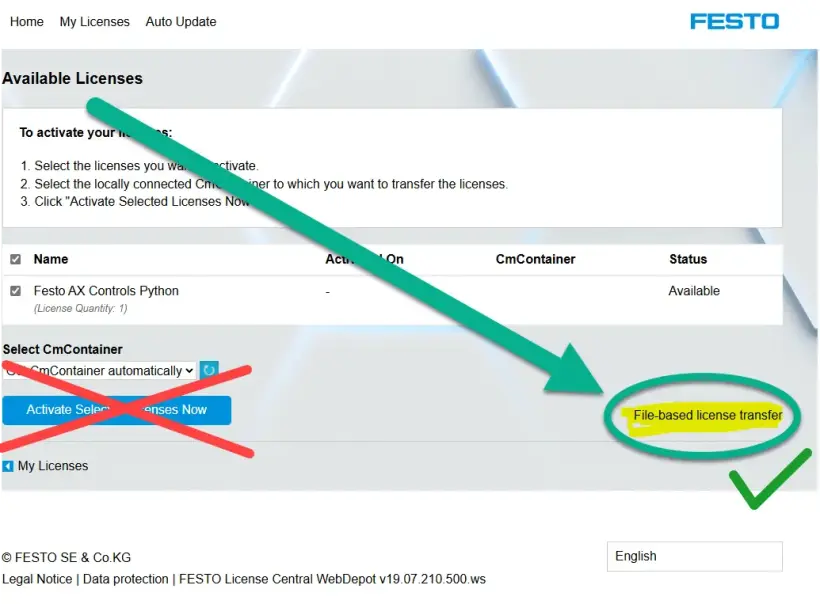
„Offline“ bedeutet, dass CEPE, WBM und der Engineering-PC offline sein können (ohne Internetverbindung). Hinweis: Klicken Sie nicht auf „Activate Selected Licenses Now“. Wenn Sie auf „Activate Selected Licenses Now“ klicken, wird die Lizenz auf Ihrem lokalen Laptop/PC aktiviert, und Sie können sie auf Ihrem Gerät nicht mehr aktivieren.
- Für Festo CODESYS-Lizenzen muss das Lizenzportal verwendet werden, da die CODESYS-Lizenzen nicht im WebDepot verfügbar sind.
- Festo Lizenzen
Aktivieren von Lizenzen mit der Festo Automation Suite:
1. Klicken Sie in der Titelleiste auf „Login“, um sich bei Ihrem MyFesto-Konto anzumelden, indem Sie in der Titelleiste „Login“ („Anmelden“) eingeben.
2. Öffnen Sie im Abschnitt die Gerätesuche.
3. Wählen Sie das Gerät aus.
4. Wählen Sie im Abschnitt „Actions“ den Menüpunkt „Licenses“ aus. Geben Sie das Passwort für das Gerät ein. Das werkseitig voreingestellte Passwort für den Benutzer „Admin“ ist auf dem Typenschild aufgedruckt.
Die für das ausgewählte Gerät verfügbaren Lizenzen werden angezeigt.
5. Wählen Sie die Lizenz aus.
Es werden die Eigenschaften und Informationen zur ausgewählten Lizenz angezeigt.
6. Klicken Sie auf „Activate“.
Die Lizenz ist auf dem Gerät aktiviert.
Aktivieren von Lizenzen mit WBM:
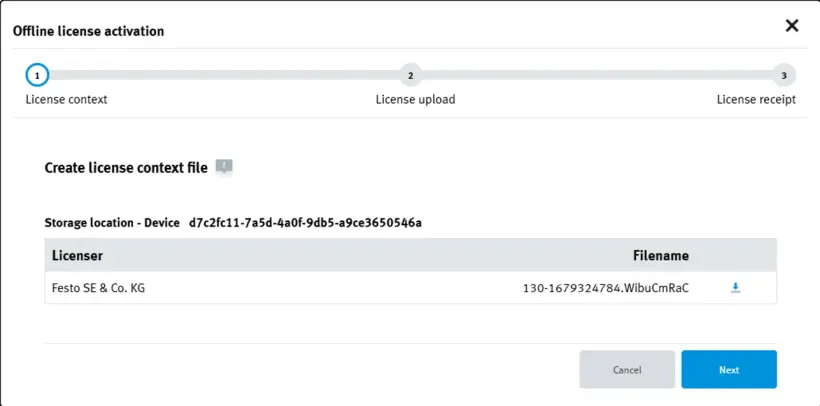
1. Erstellen Sie eine Lizenzkontextdatei:
- Öffnen Sie den Lizenzmanager in WBM:
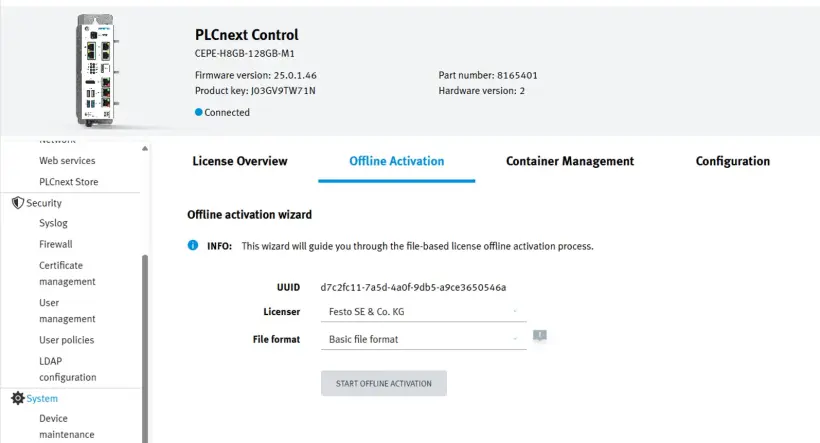
- Wählen Sie die Registerkarte „Offline Activation“ für den Festo Edge-Lizenzcontainer
- Wenn der Container nicht ausgewählt werden kann, wechseln Sie zur Registerkarte „Container Management“ und klicken Sie auf das Pluszeichen des Containers, den Sie auswählen möchten.
- Für Festo CODESYS-Lizenzen: Verwenden Sie den Festo CODESYS Edge-Lizenzcontainer.
- Wählen Sie „Basic file format“.
- Klicken Sie auf „Start Offline Activation“.
- Laden Sie die Datei xzy.WibuCmRaC herunter.
Diese Lizenzkontextdatei sollte bei jeder Aktualisierung der Lizenz neu generiert werden!
2. Aktivieren Sie die Lizenzaktualisierungsdatei.
- Gehen Sie zum Festo WebDepot: FESTO AG & Co. KG | Lizenzen
- Für Festo CODESYS-Lizenzen: Verwenden Sie das CodeMeter-Lizenzportal anstelle von WebDepot.
- Geben Sie Ihren Lizenzcode in das Textfeld ein und klicken Sie auf „Next“:
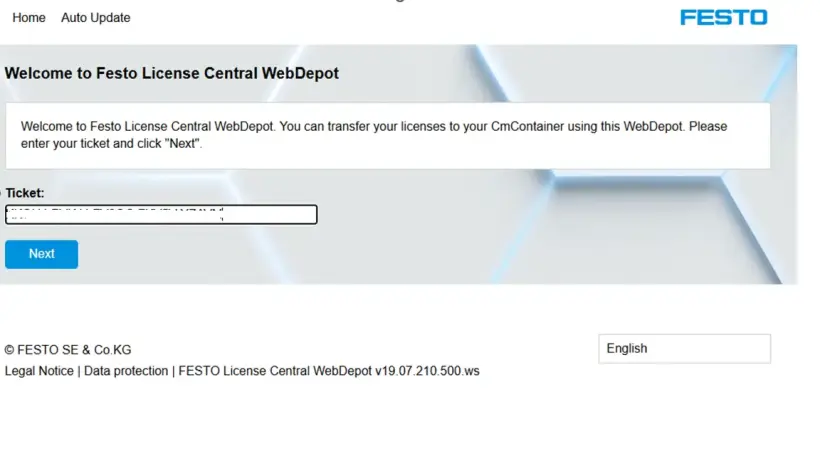
- Klicken Sie auf der nächsten Seite auf „Activate Licenses“:
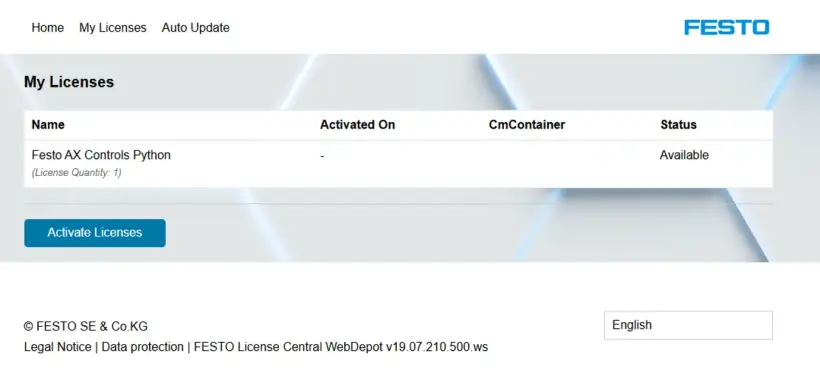
- Klicken Sie anschließend auf „File-based license transfer“:
Wenn Sie auf die blaue Schaltfläche klicken, wird die Lizenz „verbrannt“ und Sie können sie nicht mehr in Ihren Container herunterladen. Sie sollten daher den Link auf der rechten Seite verwenden, der gelb markiert ist und ein grünes Häkchen hat!
- Wählen Sie die in Schritt 1 erstellte Lizenzdatei und klicken Sie auf „Start Activation Now“:
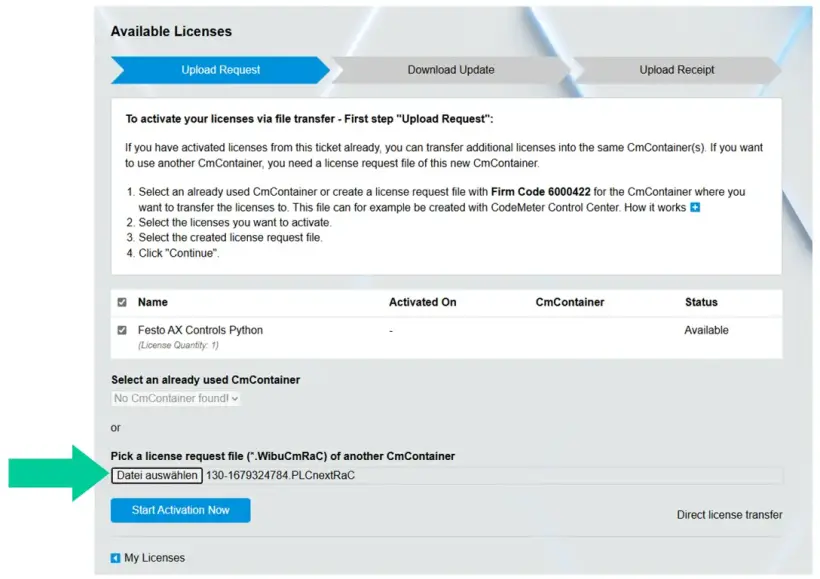
3. Laden Sie die Datei für das Lizenz-Update herunter:
- Wenn die richtige Lizenz ausgewählt wurde, klicken Sie auf „Download License Update File Now“:
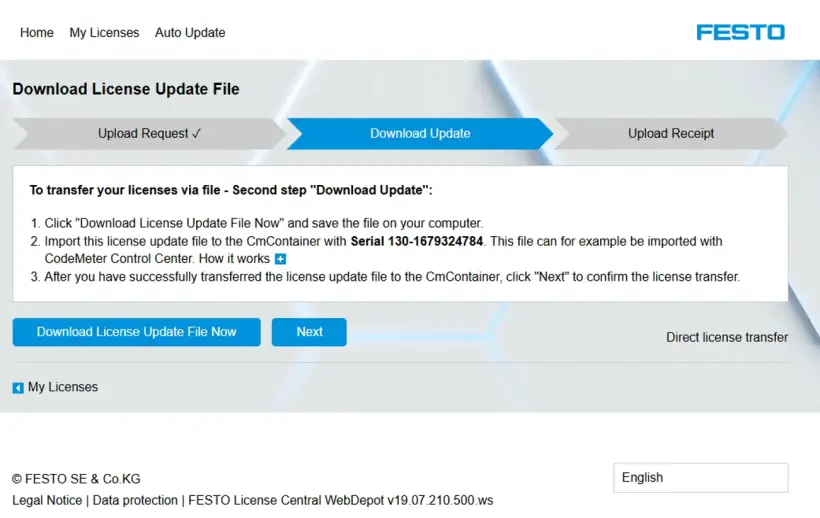
Laden Sie die Lizenzdateixyz.WibuCmRaU herunter.
4. Installation der Lizenz:
- Kehren Sie zu WBM zurück und klicken Sie auf „Next“:
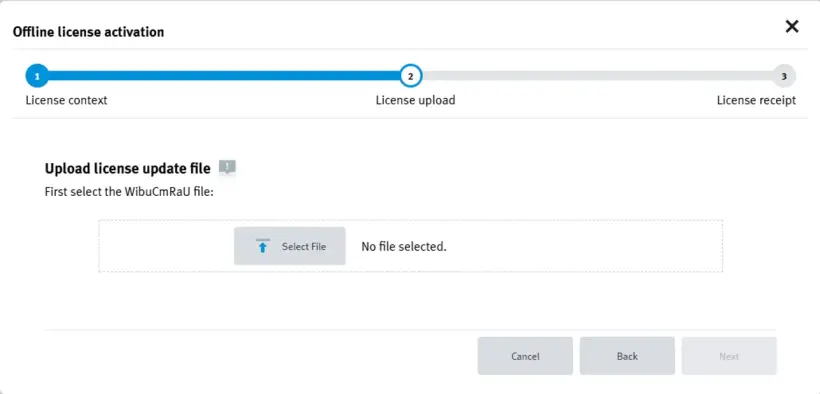
- Klicken Sie auf „Select File“ und wählen Sie die Lizenzdatei xyz.aus, die Sie gerade heruntergeladen haben:
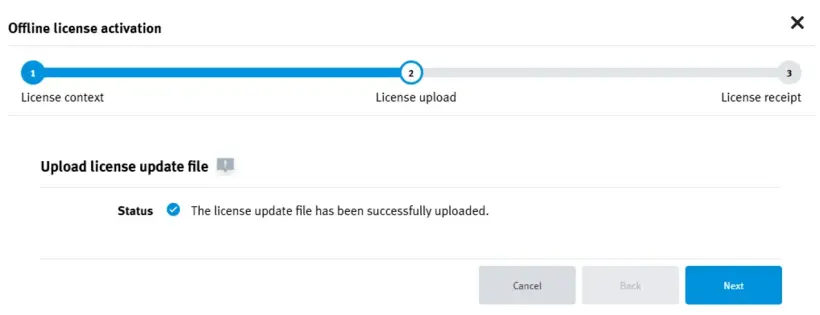
- Klicken Sie auf „Next“:
- Laden Sie die Belegdatei herunter:
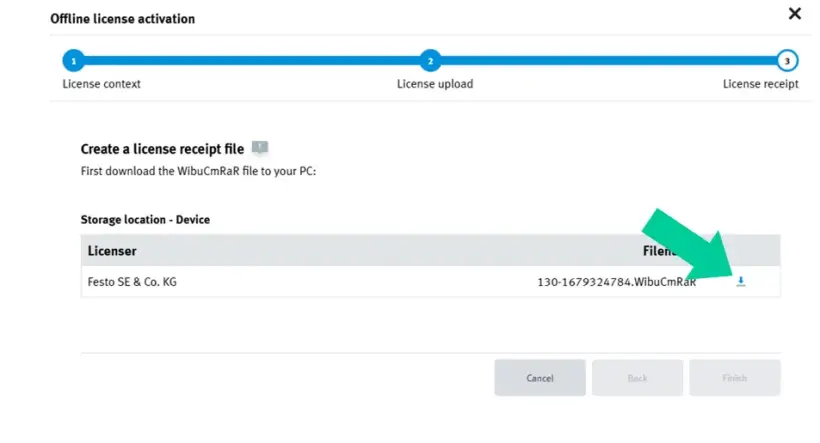
- Klicken Sie auf „Finish“:
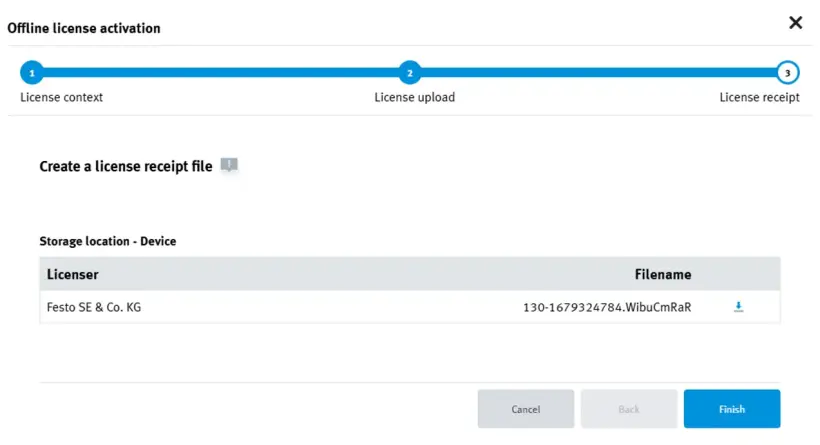
5. Schließen Sie die Installation der Lizenz in WebDepot ab.
- Gehen Sie zum Festo WebDepot und klicken Sie auf „Next“:
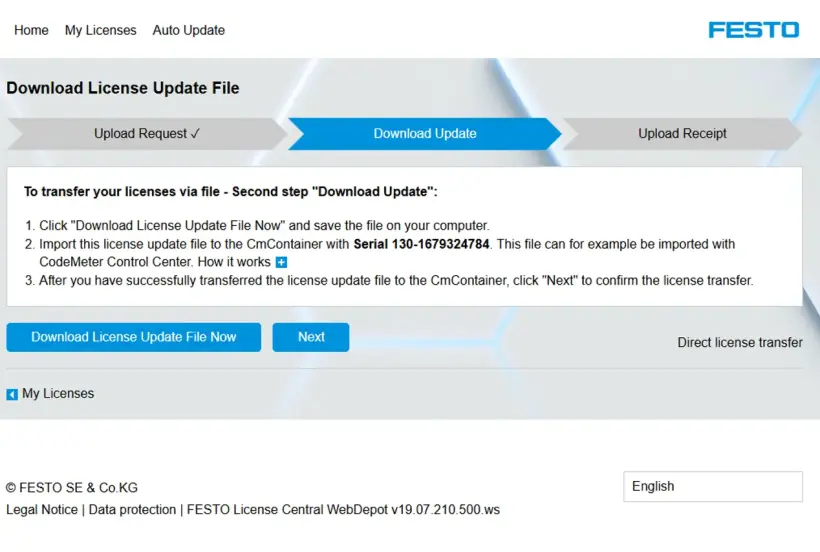
- Wählen Sie die Datei WibuCmRAR oder eine aktualisierte xyz.WibuCmRAC-Datei (das heißt *.wird im Dialogfeld angezeigt; beides ist in Ordnung) und klicken Sie auf „"Upload Receipt Now“
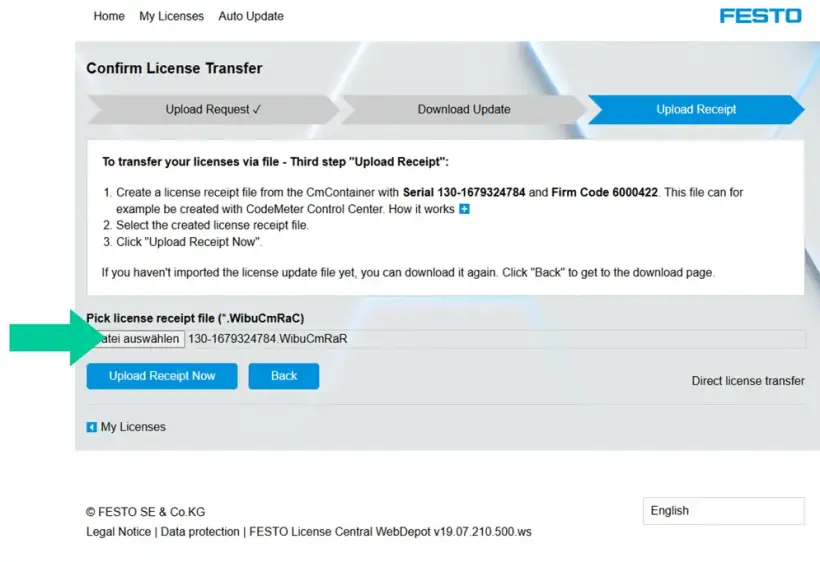
- Wenn der Vorgang abgeschlossen ist, klicken Sie auf „OK“:
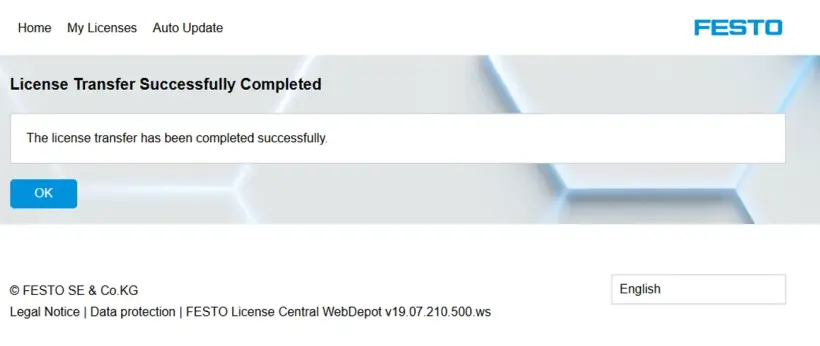
- Der Lizenzstatus in WebDepot sollte nun „Activated“ lauten.
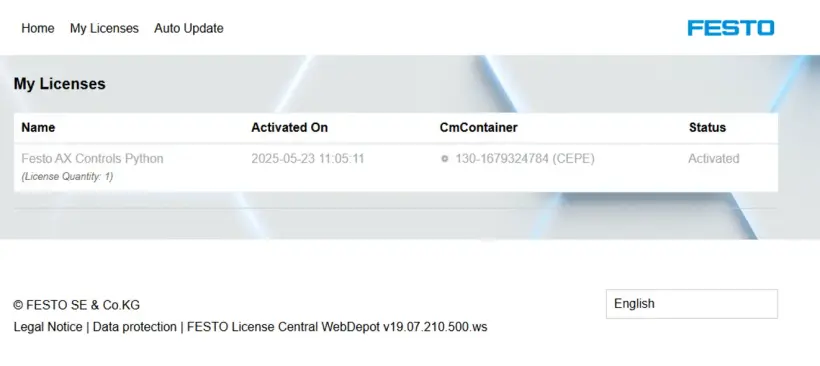
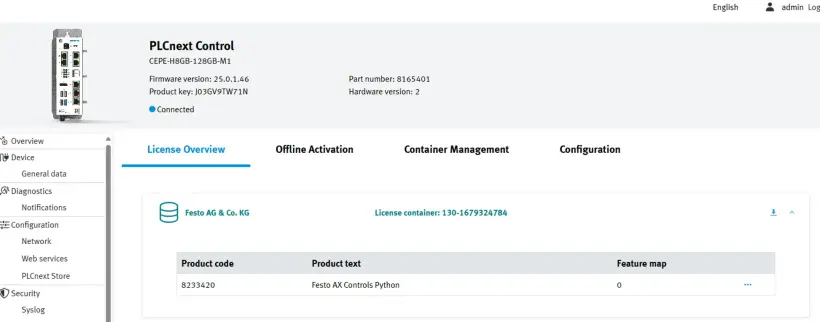
6. Lizenz prüfen
- Kehren Sie zu WBM zurück und wählen Sie „License Overview“
So aktivieren Sie Ihre FluidSIM 365 Lizenz
Es gibt 3 Möglichkeiten, Ihre Lizenzen zu aktivieren:
Die beste Methode zur Aktivierung und Verwaltung Ihrer FluidSIM 365 Lizenz hängt davon ab, wie Sie FluidSIM nutzen möchten und ob Sie über eine ständige Internetverbindung verfügen:
Zur Nutzung von FluidSIM:
1. auf Windows und/oder im Web (fluidsim.festo.com) -> Lösen Sie Ihre Lizenz im FluidSIM Lizenzmanager ein (ständige Internetverbindung erforderlich).
Am besten geeignet für: Schulen oder Ausbildungszentren, die einen kontrollierten, gruppenbasierten Zugang ohne Einsatz von Festo LX bevorzugen.
2. im Internet (fluidsim.festo.com) und in Festo LX -> Lösen Sie Ihre Lizenz in Festo LX ein (ständige Internetverbindung erforderlich).
Am besten geeignet für: Einrichtungen, die Festo LX nutzen oder Benutzer über eine LX-Organisation verwalten.
3. nur unter Windowsim Offline-Modus -> Lösen Sie Ihre Lizenz im FluidSIM Aktivierungsassistenten ein (einmalige Internetverbindung erforderlich).
Am besten geeignet für: Umgebungen ohne ständigen Internetzugang (wird nur von der Windows-Version von FluidSIM unterstützt)
- Eine FluidSIM V6-Lizenz kann nur unter Windows genutzt werden. Daher kann sie nur mit der ersten und der dritten Option verwendet werden.
- Sie können jederzeit zwischen allen Aktivierungsmethoden wechseln.
2. Aktivierung über Festo LX
- Funktioniert mit der FluidSIM-Webversion und in Festo LX
- Erfordert einen ständigen Internetzugang
- Funktioniert nicht mit FluidSIM für Windows
Ersteinrichtung und Einrichtung von Schülerzugängen
Nachdem Sie eine LX-Organisation angelegt haben, können Sie in Festo LX einen beliebigen Lizenzschlüssel eingeben, auch den FluidSIM-Lizenzschlüssel.
3. Aktivierung über den Aktivierungsassistenten
- Funktioniert nur mit der Windows-Version von FluidSIM
- Erfordert einmaligen Internetzugang
- Kann anschließend offline genutzt werden
1. Aktivierung über den Lizenzmanager
- Kompatibel mit der Windows- und der Web-Version von FluidSIM
- Erfordert einen ständigen Internetzugang
Ersteinrichtung und Einrichtung von Schülerzugängen
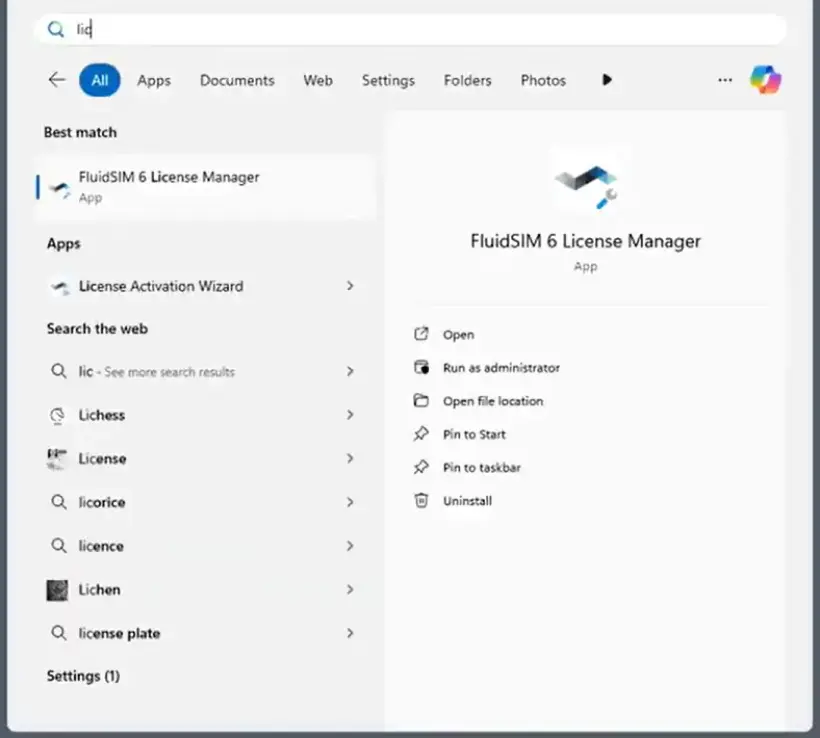
1. Öffnen Sie den FluidSIM-Lizenzmanager auf Ihrem PC.
- Er wird automatisch installiert, wenn Sie die Windows-Version von FluidSIM installieren
- Falls er noch nicht installiert ist, können Sie das komplette Installationsprogramm oder nur den Lizenzmanager hier herunterladen.
2. Erstellen Sie ein Konto.
- Wenn Sie bereits ein Konto haben, fahren Sie bitte mit Schritt 3 fort.
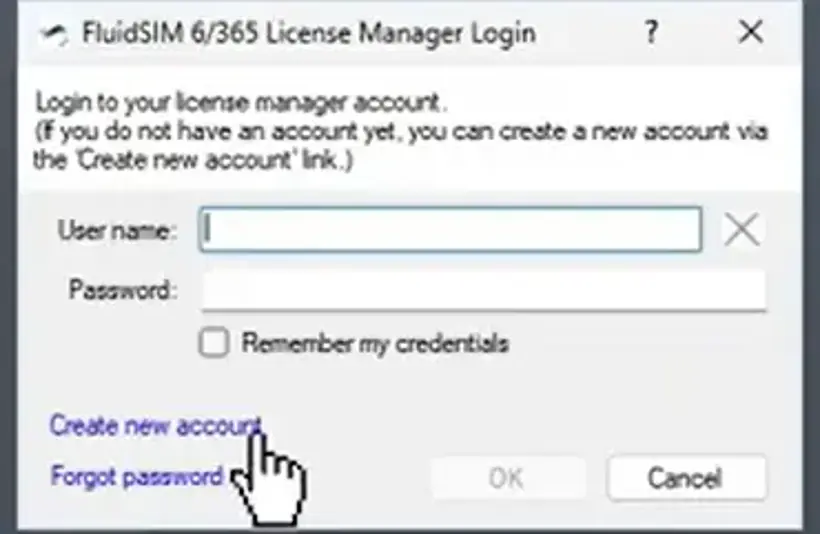
- Wenn nicht, klicken Sie auf „Create new account“ und füllen Sie die Felder Benutzername, Passwort und Lizenzschlüssel (Ticketnummer) aus und klicken Sie auf „Create new account”.
- Der Lizenzschlüssel (Ticketnummer) wurde Ihnen von Festo beim Kauf der Lizenz zugesandt.
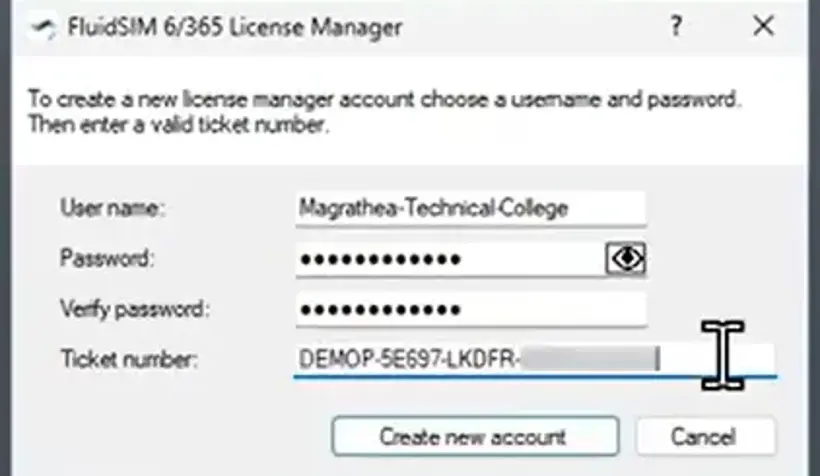
- Ihr Konto wurde nun erstellt.
3. Melden Sie sich mit Ihrem Konto an.
- Geben Sie Benutzername und Passwort ein und klicken Sie auf „OK”.
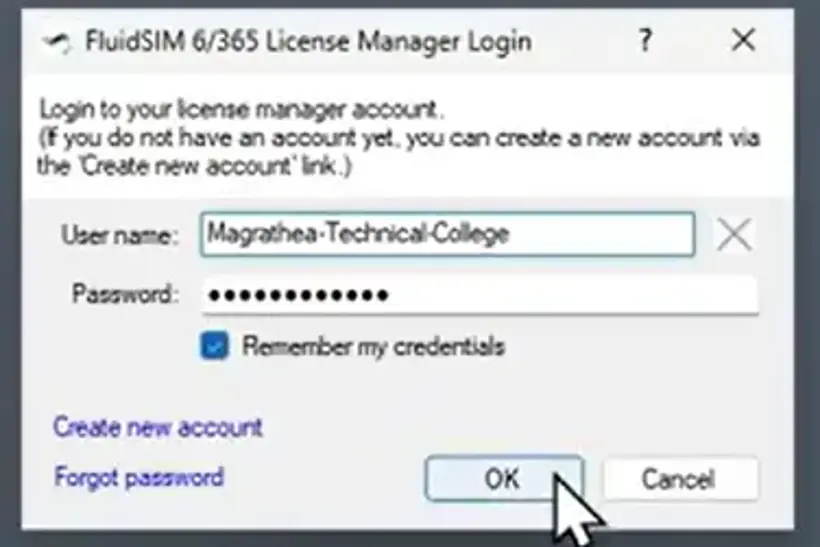
4. Fügen Sie Ihrem Konto weitere Lizenzen hinzu.
- Klicken Sie auf Lizenzen verwalten -> Ticket hinzufügen -> Geben Sie Ihr Lizenz-Ticket ein.
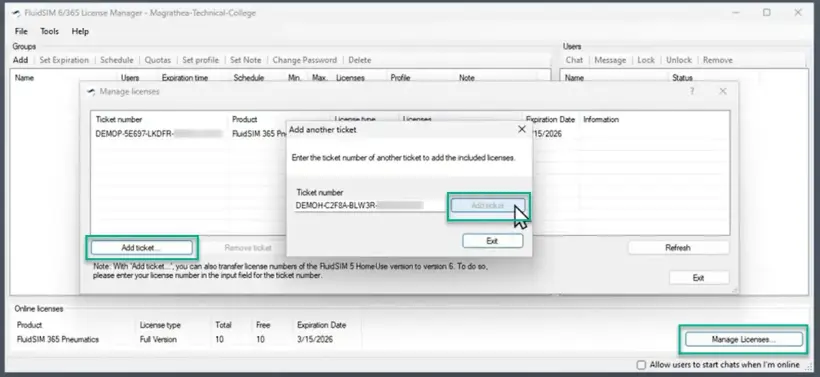
5. Erstellen Sie eine Benutzergruppe.
- Klicken Sie auf „Add“ und legen Sie den Gruppennamen und das Passwort fest.
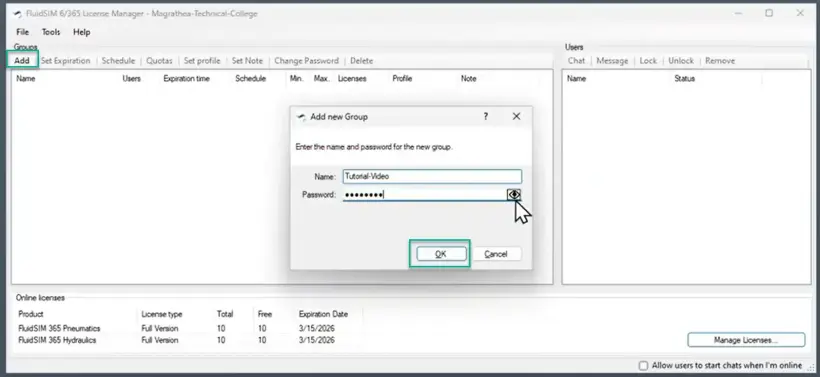
6. Teilen Sie Ihren Schülern die Zugangsdaten mit.
- Teilen Sie den Gruppennamen (im Beispiel: (Tutorial-Video) und das Passwort (••••••••) per E-Mail oder auf andere Weise mit Ihren Schülern, damit diese sich mit den soeben erstellten Zugangsdaten anmelden können.
- Geben Sie den Lizenzschlüssel (Ticketnummer) von Festo niemals an Ihre Schüler weiter. Dadurch würden diese Zugriff auf die Verwaltung Ihrer Lizenzen erhalten. Geben Sie nur Informationen auf Gruppenebene weiter.
7. Erweiterte Einstellungen
- Legen Sie ein Ablaufdatum, tägliche/stündliche Zugriffsbeschränkungen oder Kontingente fest oder weisen Sie Ihrer Benutzergruppe ein vordefiniertes Profil zu.
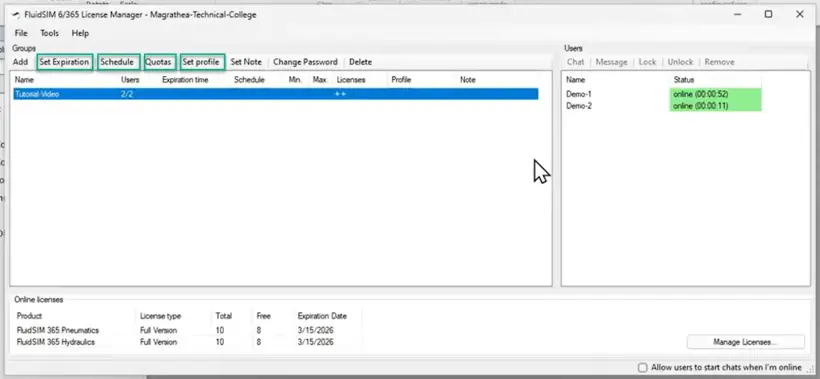
Ersteinrichtung und Einrichtung von Schülerzugängen
1. Installieren Sie FluidSIM 6
Laden Sie FluidSIM V6 hier herunter und installieren Sie es auf Ihrem PC
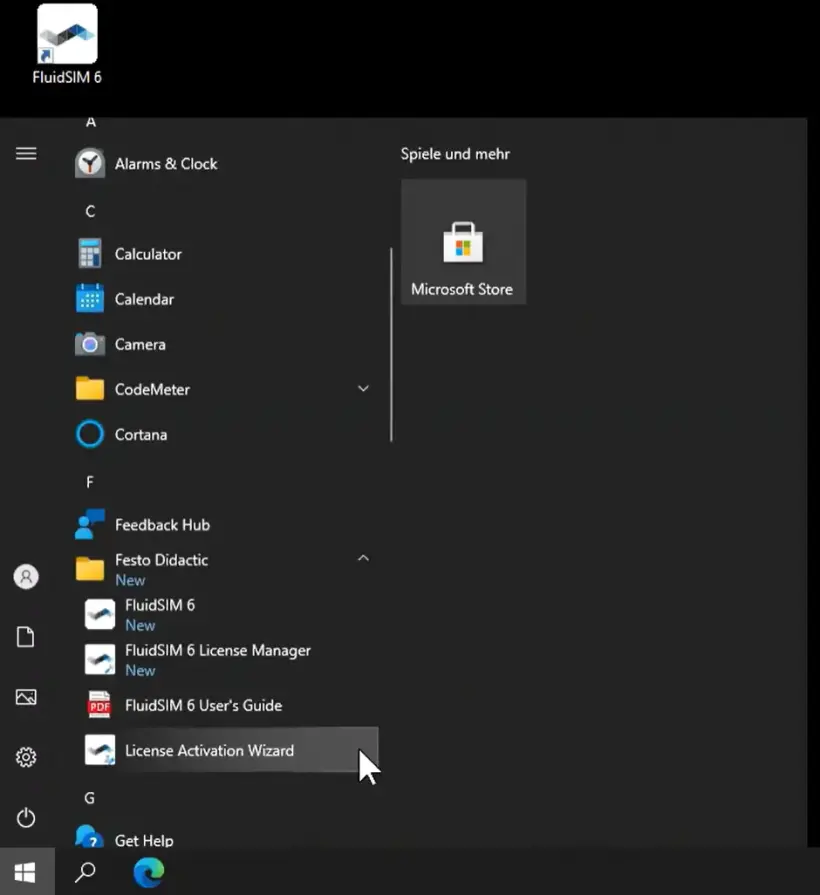
2. Öffnen Sie den FluidSIM-Aktivierungsassistenten auf Ihrem PC.
- Er wird automatisch zusammen mit der Windows-Version von FluidSIM installiert.
- Falls er noch nicht installiert ist, können Sie das komplette Installationsprogramm oder nur den Aktivierungsassistenten hier herunterladen.
3. Geben Sie Ihren Lizenzschlüssel ein.
- Der Lizenzschlüssel wurde Ihnen von Festo beim Kauf der Lizenz zugesandt
- Wenn Sie auf „View or edit additional ticket numbers“ klicken, können Sie mehrere Tickets in einem Schritt hinzufügen
4. Aktivieren Sie Ihre Lizenzen auf Ihrem PC/Server.
- Wenn der eingegebene Lizenzschlüssel gültig war, werden die Anzahl der Lizenzplätze und das mit dem Lizenzschlüssel verbundene Technologiepaket angezeigt.
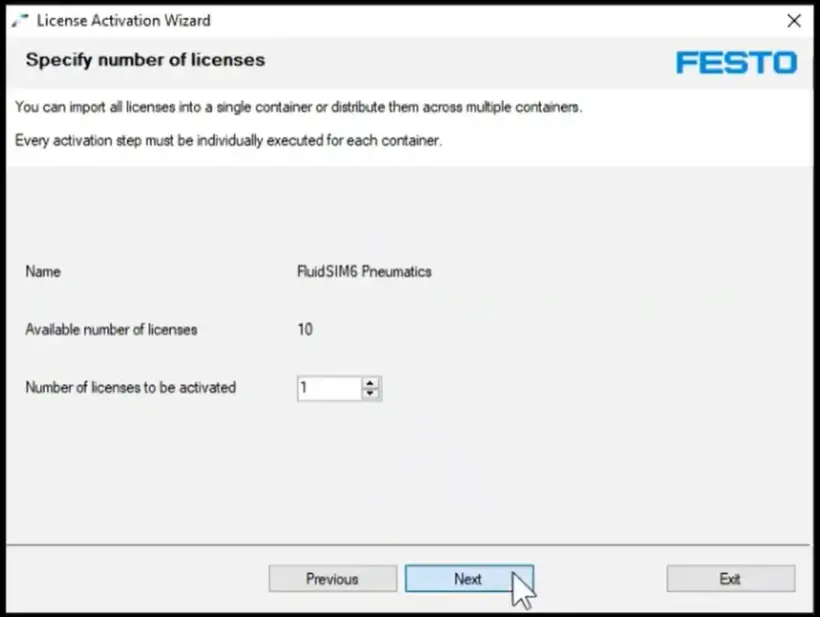
- Klicken Sie auf „Activate“ und wählen Sie die Anzahl der Lizenzen aus, die Sie auf Ihrem PC/Server aktivieren möchten.
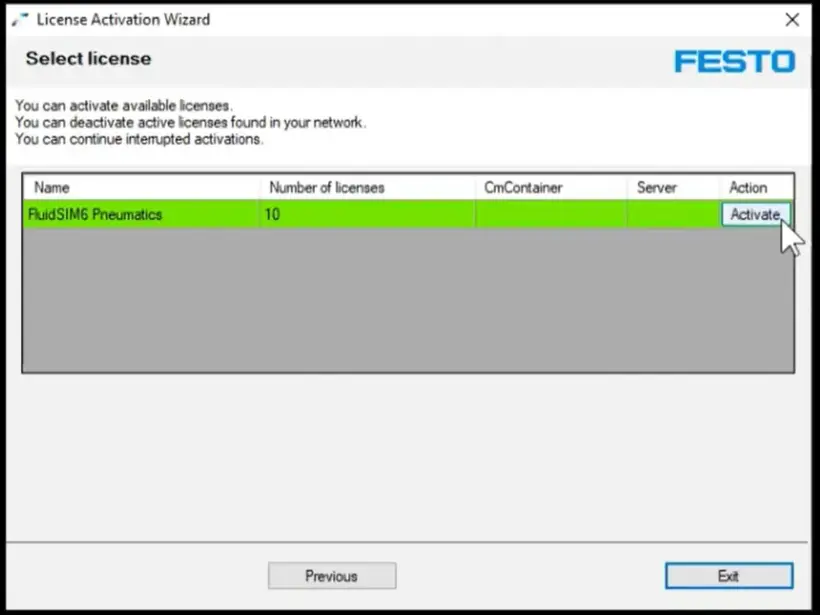
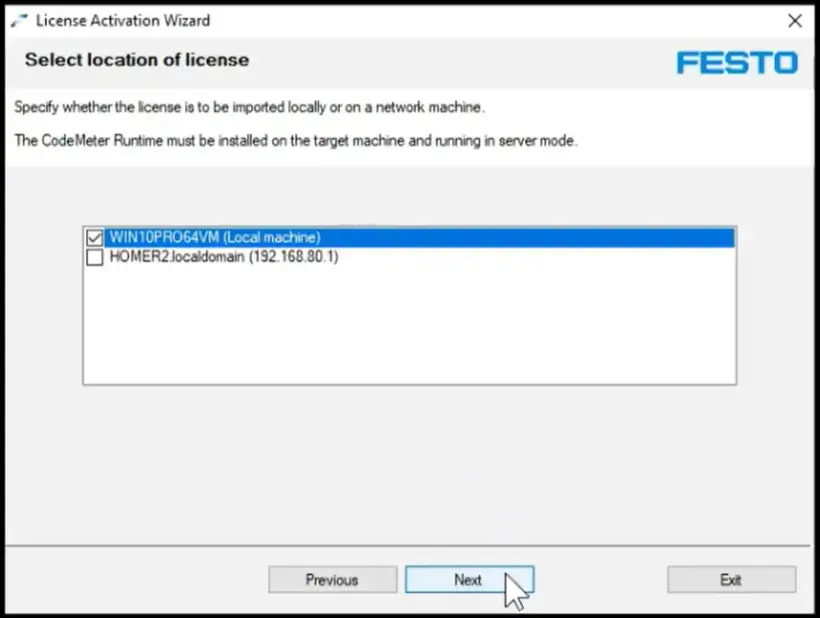
- Wählen Sie den PC/Server aus, auf dem Sie die Lizenzen aktivieren möchten.
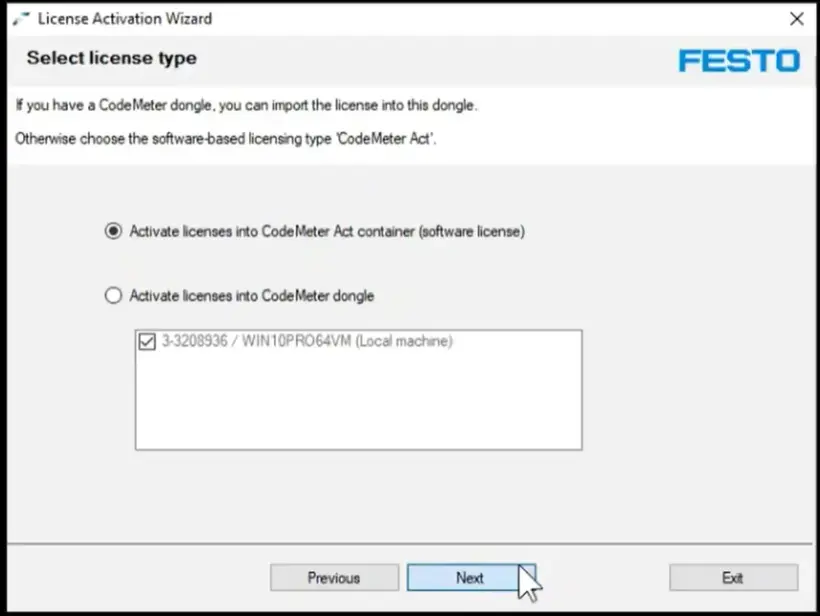
- Wählen Sie als Lizenztyp die erste Option (Container) aus, es sei denn, Sie möchten einen USB-Lizenzstecker für die Lizenzierung verwenden (weitere Informationen zu dieser Option hier).
5. Erfolgreiche Aktivierung
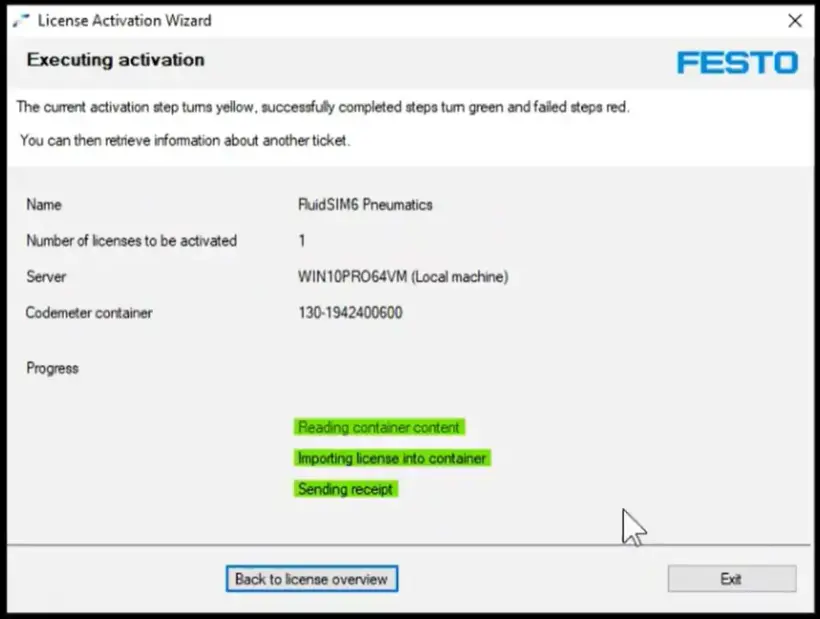
- Sobald Sie die vorstehenden Schritte ausgeführt haben, wird eine Bestätigung der Aktivierung angezeigt.
- Ab sofort benötigen Sie keine Internetverbindung mehr, um FluidSIM für Windows auszuführen.
6. Deaktivierung (optional)
- Wenn Sie die Lizenzen auf Ihrem PC/Server deaktivieren möchten, geben Sie einfach Ihren Lizenzschlüssel erneut im Aktivierungsassistenten ein.
- Sie erhalten einen Überblick über die Anzahl der Lizenzplätze und das mit dem Lizenzschlüssel verbundene Technologiepaket sowie darüber, ob und wo diese aktiviert sind.
- Klicken Sie auf „Deactivate“, um den Lizenzplatz von Ihrem lokalen PC zu deaktivieren und ihn zurück in die Festo Cloud zu übertragen. Sie können diesen Lizenzplatz nun auf einem anderen PC nutzen.
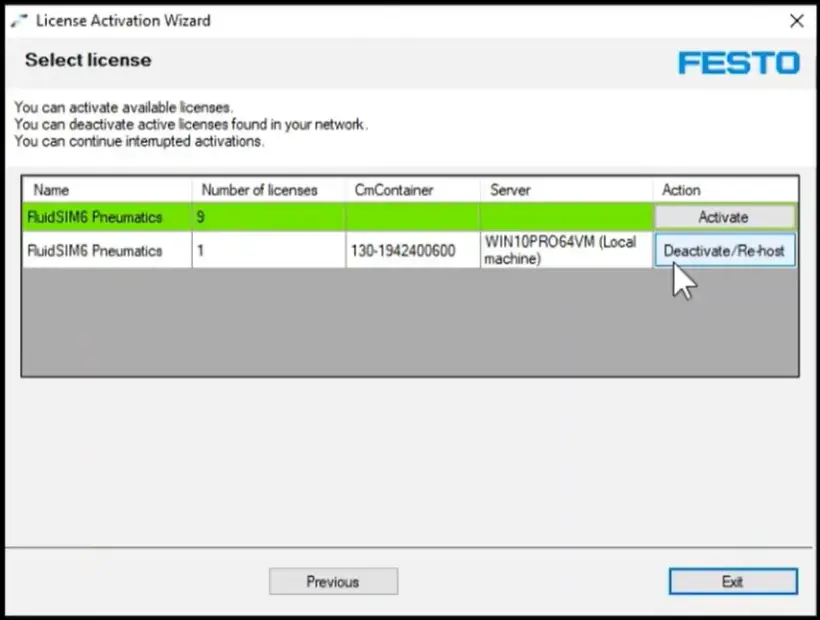
So aktivieren Sie Ihre FPosCR (GSBE-R1-P & GSBE-R2-P)Lizenz
Manuelles Aktivieren der Lizenz auf einer älteren SPS
1. Bestellen Sie die Lizenz und rufen Sie die Lizenz-Ticket-ID ab.
Befolgen Sie die Schritte zur Online-Bestellung einer Lizenz.
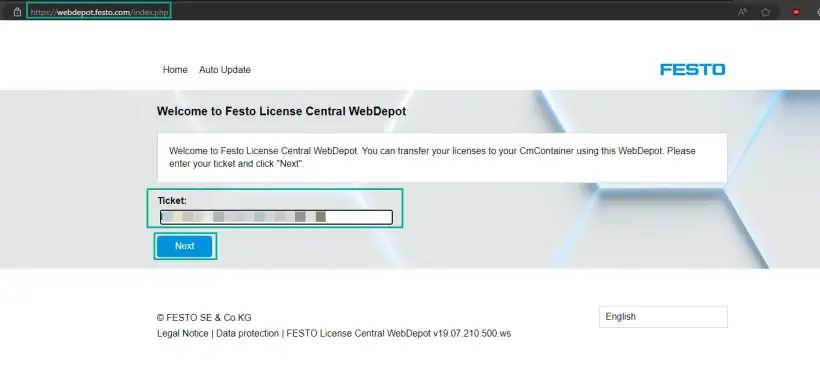
2. Gehen Sie zum Festo WebDepot und starten Sie den Aktivierungsprozess.
Öffnen Sie den Lizenzserver, geben Sie die Ticket-ID ein und klicken Sie auf „Next”.
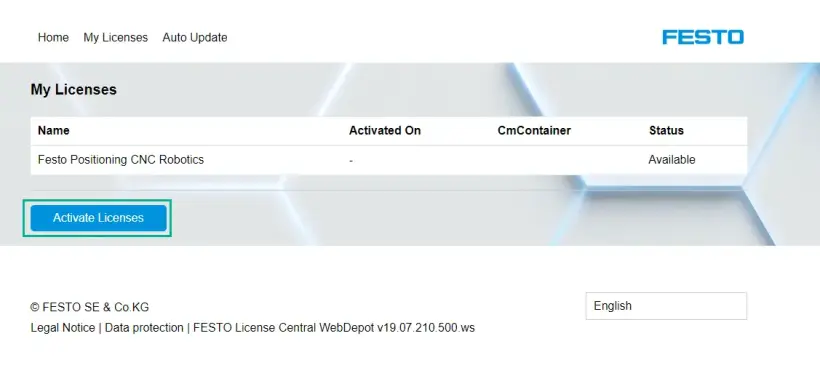
Klicken Sie auf „Activate Licenses”.
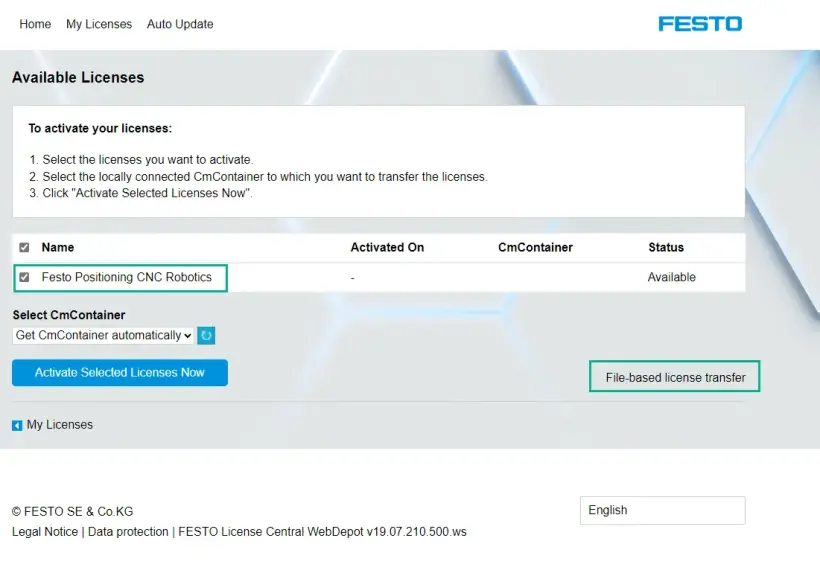
Wählen Sie den Containertyp aus:
- Links: Festo AG Embedded [ 2004 ] (z. B. CECC-X, CPX-E-CEC)
- Rechts: Festo Edge [2P02] (z. B. CEPE) auf Basis der PlcNext-Plattform
![Festo WebDepot-Seite mit zwei Containertypen: Festo AG Embedded [ 2004 ] (z. B. CECC-X, CPX-E-CEC) und Festo Edge [ 2P02 ] (z. B. CEPE) auf Basis der PlcNext-Plattform](https://www.festo.com/media/cms/central/media/mam_upload/image5~1_w820.webp)
Wählen Sie die Lizenz aus und klicken Sie auf „file-based license transfer“.
3. Laden Sie WibuCmRaC von der SPS herunter.
Öffnen Sie die Weboberfläche Ihrer SPS (IP-Adresse im Webbrowser) -> Lizenzierung -> Lizenzaktualisierung
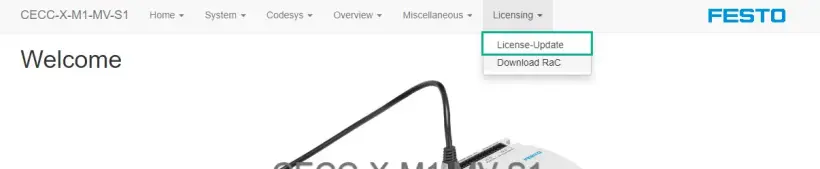
Laden Sie die Statusdatei des Lizenzcontainers herunter.
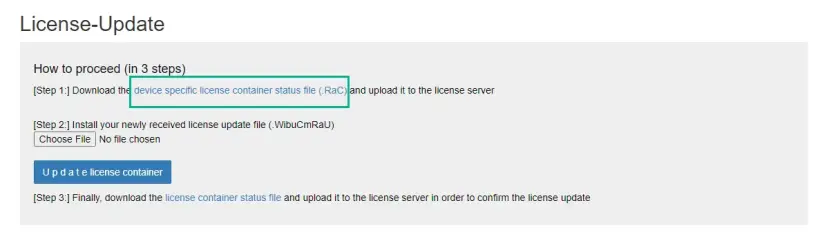
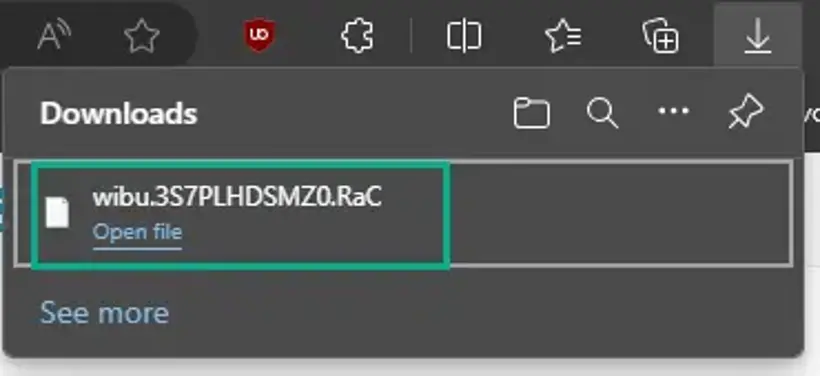
4. Laden Sie WibuCmRaC in das WebDepot.
Gehen Sie zum WebDepot und wählen Sie die WibuCmRac Datei aus und starten Sie den Aktivierungsprozess.
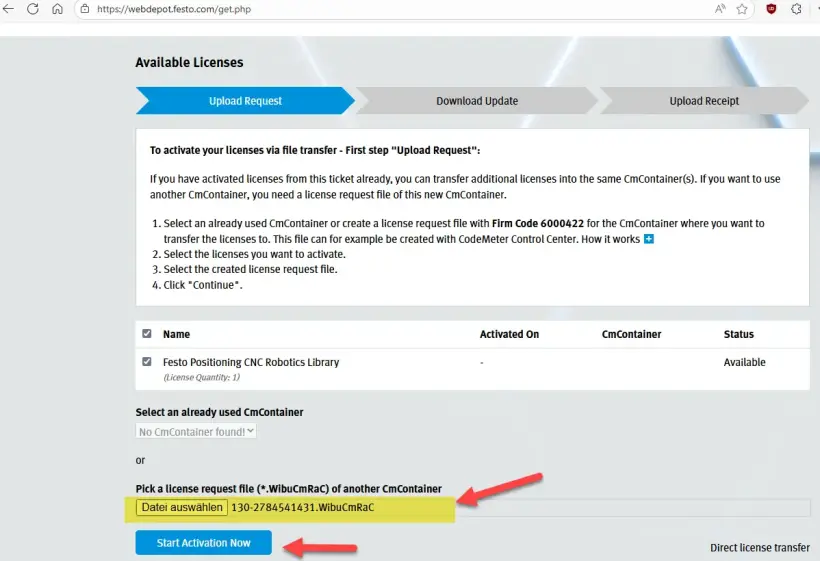
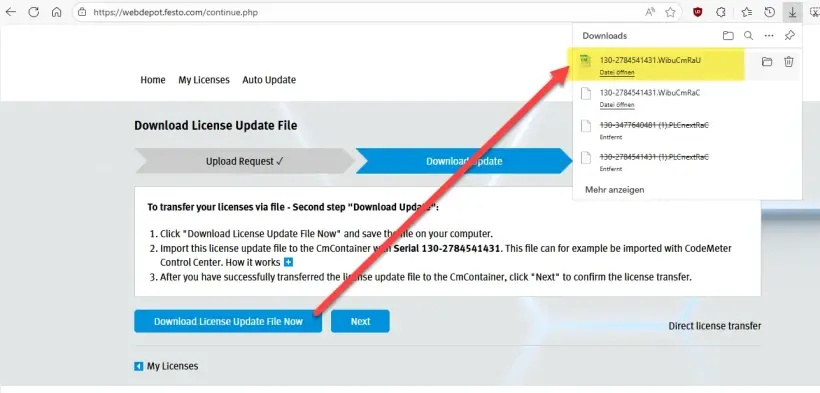
5. Laden Sie die aktualisierte Version von WibuCmRaU auf Ihren Computer herunter.
Laden Sie nach der Aktivierung die WibuCmRaU Datei auf Ihren PC herunter.
6. Laden Sie die WibuCmRaU auf die SPS.
Kehren Sie zur Weboberfläche Ihrer SPS zurück und wählen Sie die heruntergeladene Datei *.WibuCmRaU Datei aus.
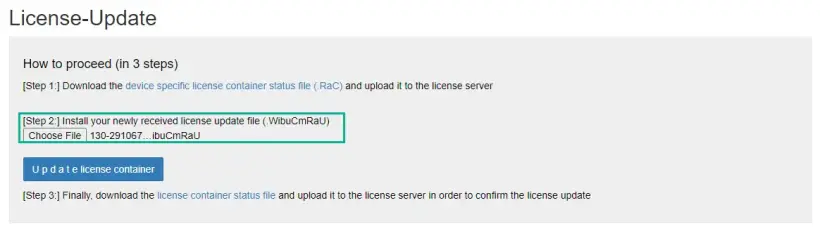
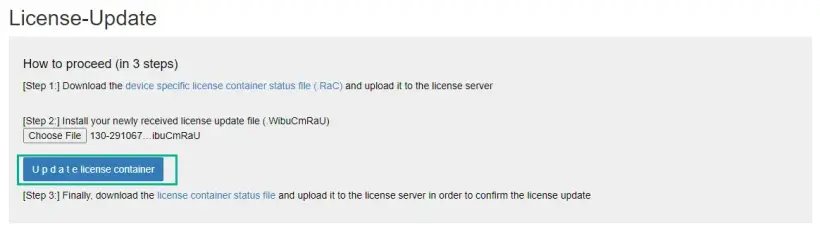
Aktualisieren Sie den Lizenzcontainer. Nach dem erfolgreichen Update fahren Sie mit Schritt 3 fort.
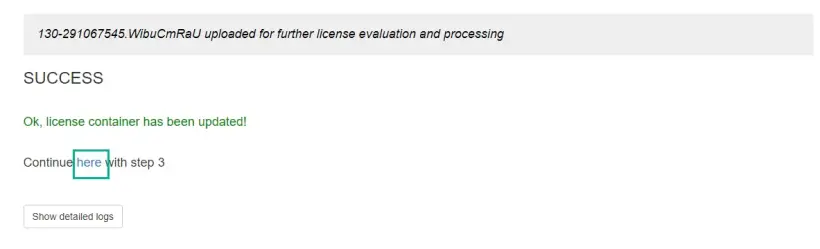
7. Laden Sie den Beleg WibuCmRaR von der SPS auf Ihren PC.
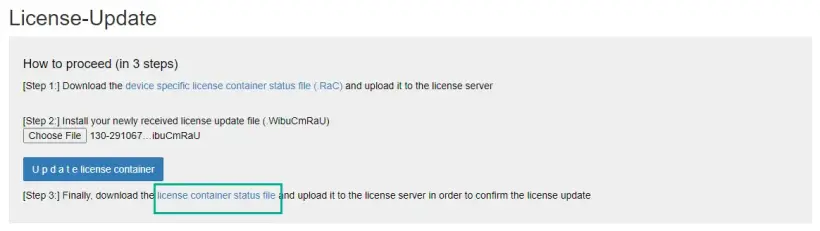
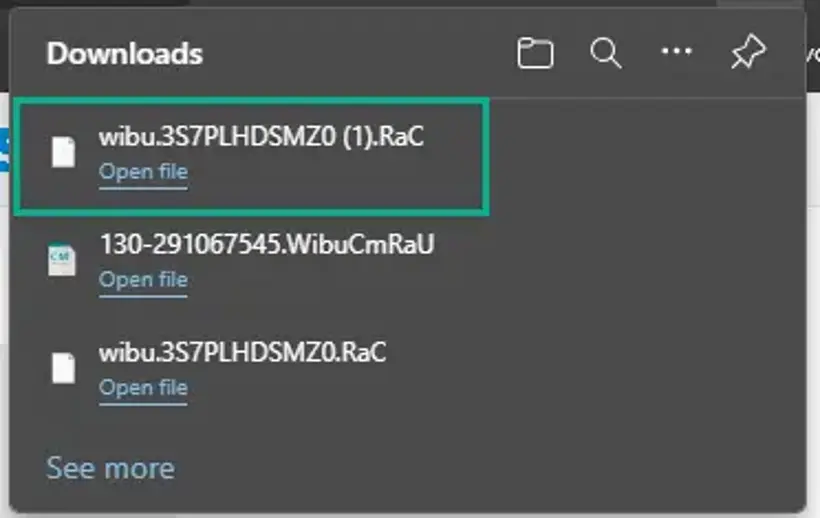
8. Laden Sie den Beleg WibuCmRaR in das WebDepot.
Kehren Sie zum Lizenzserver zurück und fahren Sie mit dem letzten Schritt fort.
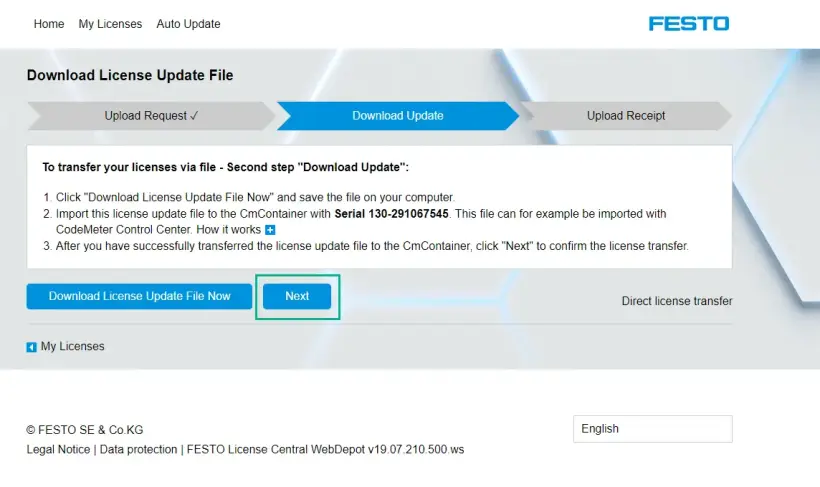
Wählen Sie die zuletzt heruntergeladene Datei aus und laden Sie sie hoch.
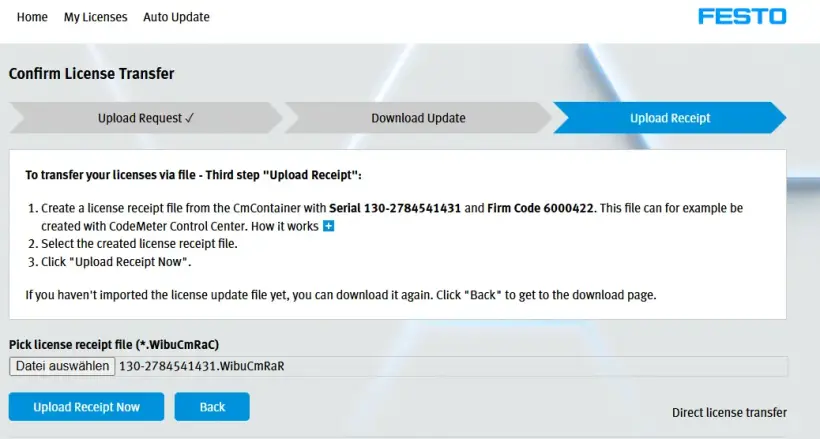
Sobald der Upload erfolgreich abgeschlossen ist, klicken Sie auf „OK”, um fortzufahren. FPosCR ist nun auf dem Server aktiviert.
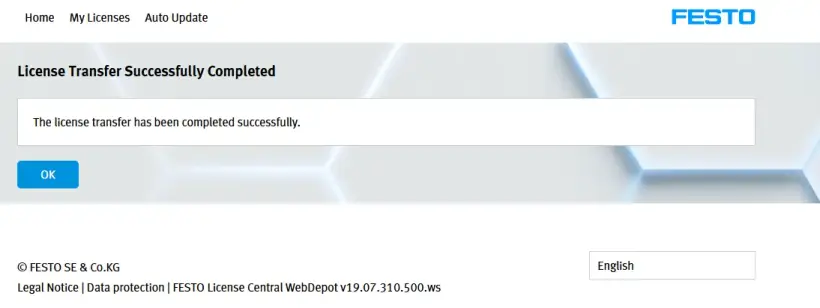
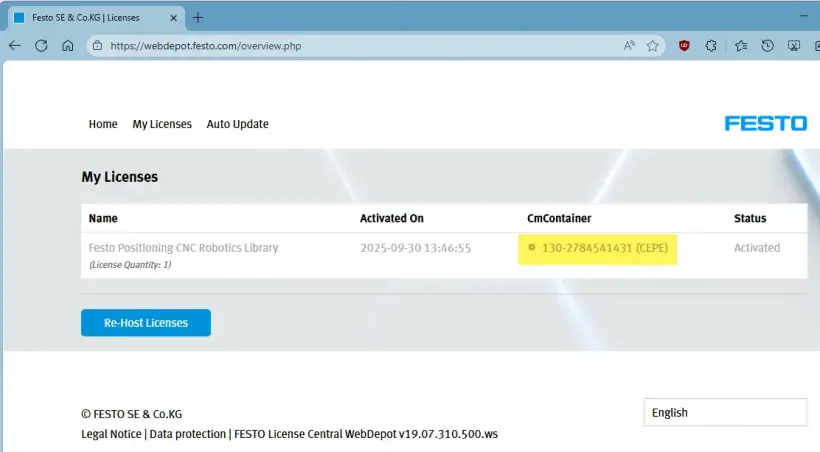
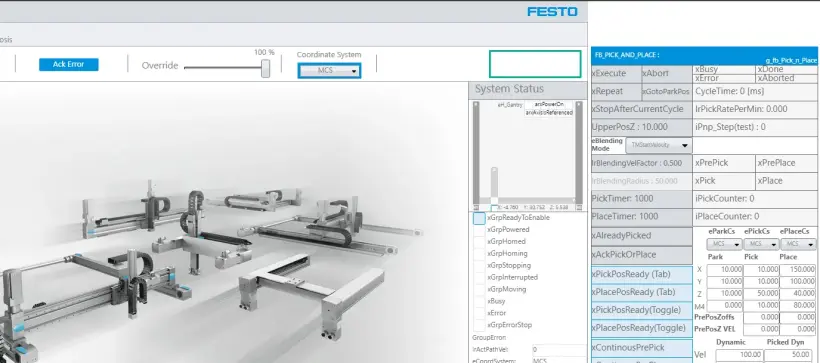
9. Überprüfen Sie das Ergebnis der Aktivierung.
Der DEMO-MODUS ist auf dem FPosCR deaktiviert.
Manuelle Aktivierung der CEPE-Lizenz
1. Bestellen Sie die Lizenz und rufen Sie die Lizenz-Ticket-ID ab.
Befolgen Sie die Schritte zur Online-Bestellung einer Lizenz.
2. Gehen Sie zum Festo WebDepot und starten Sie den Aktivierungsprozess.
Öffnen Sie den Lizenzserver, geben Sie die Ticket-ID ein und klicken Sie auf „Next”.
Klicken Sie auf „Activate Licenses”.
Wählen Sie den Containertyp aus:
- Links: Festo AG Embedded [ 2004 ] (z. B. CECC-X, CPX-E-CEC)
- Rechts: Festo Edge [2P02] (z. B. CEPE) auf Basis der PlcNext-Plattform
Wählen Sie die Lizenz aus und klicken Sie auf „file-based license transfer“.
3. Laden Sie WibuCmRaC von der SPS herunter.
Überprüfen Sie den Namen des Lizenzcontainers anhand des entsprechenden Firmencodes -> Für FPosCR sollte der Container mit dem Firmencode 6000422 verwendet werden.
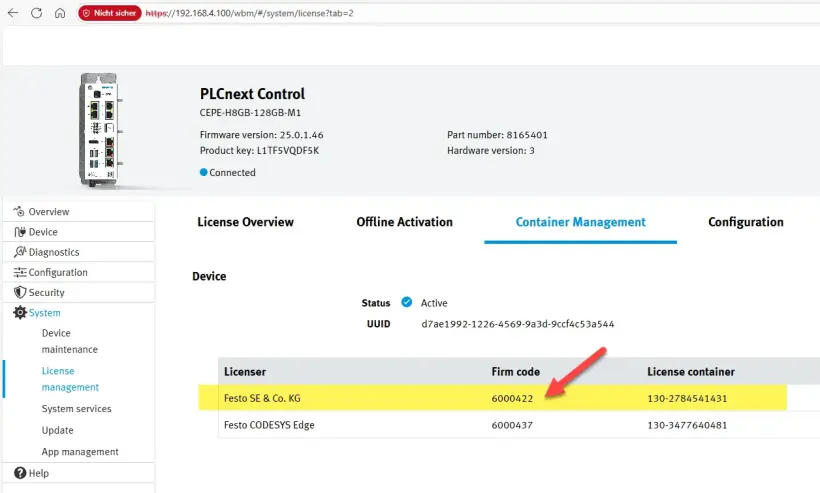
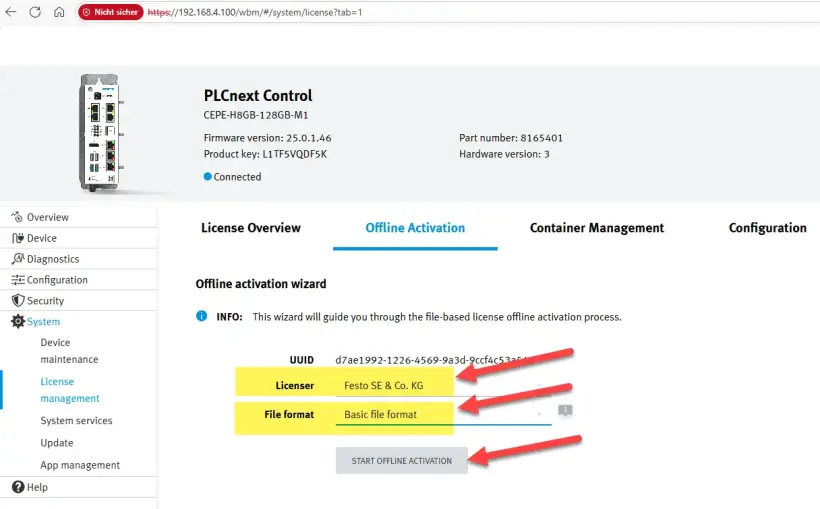
Gehen Sie zu Offline Activation, wählen Sie den richtigen Container (Lizenzgeber) und das Dateiformat aus und klicken Sie auf „Start Offline Activation“.
Laden Sie die WibuCmRaC Datei auf Ihren PC herunter und klicken Sie auf „Next“.
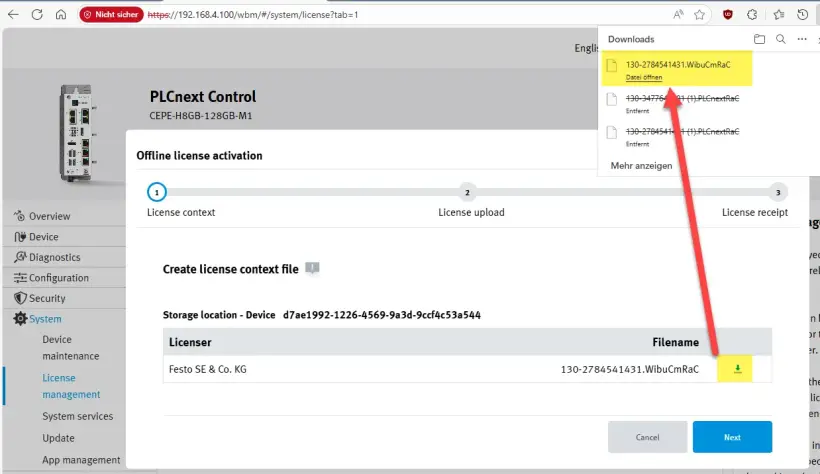
4. Laden Sie WibuCmRaC in das WebDepot.
Gehen Sie zum WebDepot und wählen Sie die WibuCmRac Datei aus und starten Sie den Aktivierungsprozess.
5. Laden Sie die aktualisierte Version von WibuCmRaU auf Ihren Computer herunter.
Laden Sie nach der Aktivierung die WibuCmRaU Datei auf Ihren PC herunter.
6. Laden Sie die WibuCmRaU auf die SPS.
Wählen Sie die WibuCmRaU Datei aus.
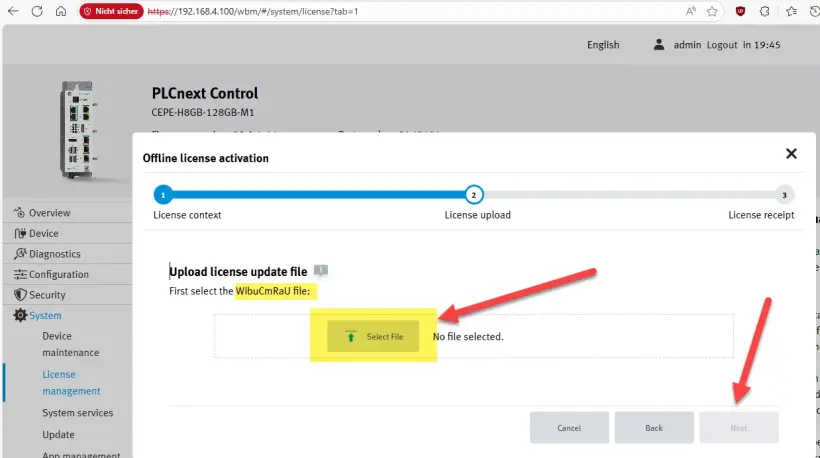
Wenn der Upload abgeschlossen ist -> Klicken Sie auf „Next“.
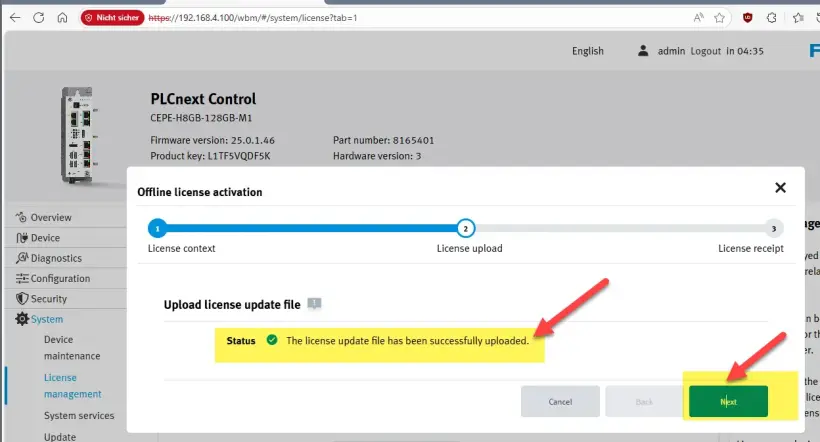
7. Laden Sie den Beleg WibuCmRaR von der SPS auf Ihren PC.
Laden Sie die Belegdatei herunter -> Klicken Sie auf „Finish“.
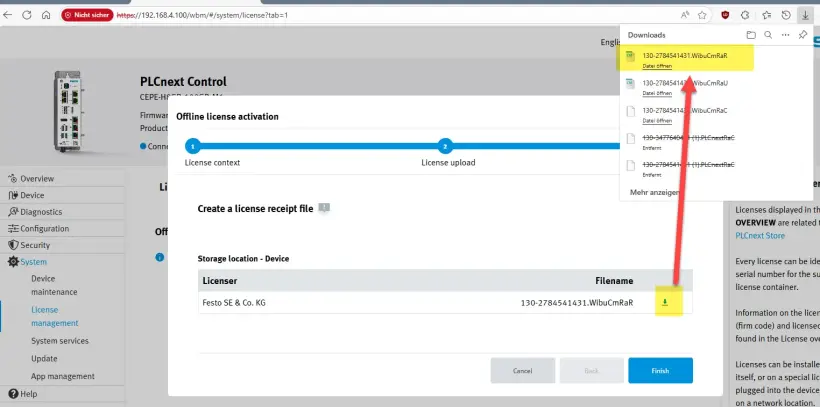
8. Laden Sie den Beleg WibuCmRaR in das WebDepot.
Laden Sie die WibuCmRaR in das WebDepot.
Der Aktivierungsprozess ist abgeschlossen.
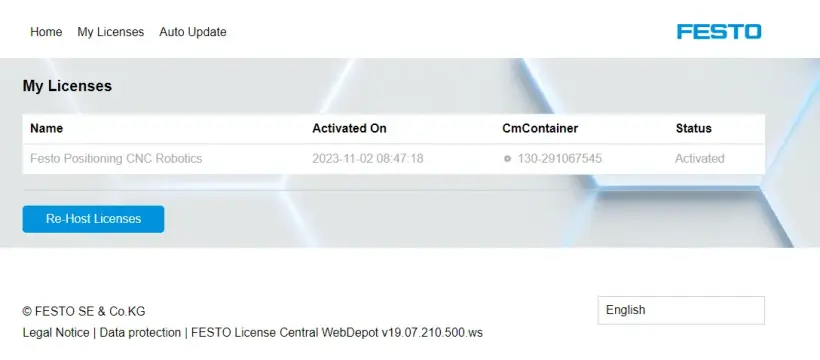
9. Überprüfen Sie das Ergebnis der Aktivierung.
Der DEMO-MODUS oben rechts ist auf dem FPosCR deaktiviert.
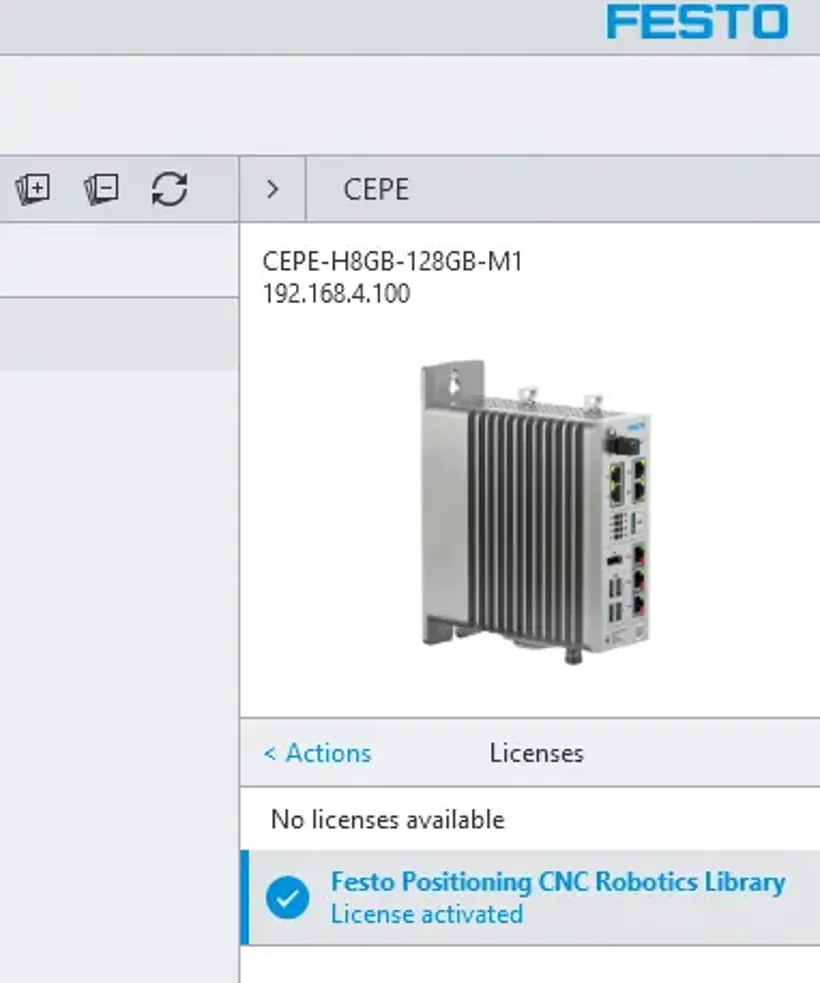
Die CEPE-Lizenz manuell neu hosten
1. Rufen Sie die Lizenz-Ticket-ID.
Rufen Sie die Lizenz-Ticket-ID der Lizenz auf Ihrer SPS ab.
2. Gehen Sie zum Festo WebDepot und starten Sie den Rehosting-Prozess.
Öffnen Sie den Lizenzserver, geben Sie die Ticket-ID ein und klicken Sie auf „Next”.
Klicken Sie auf „Re-Host Licenses“.
Wenn die Lizenz zur Aktivierung verwendet wurde, werden das Aktivierungsdatum sowie die CmContainer-Nummer angezeigt, unter der die Lizenz aktiviert wurde.
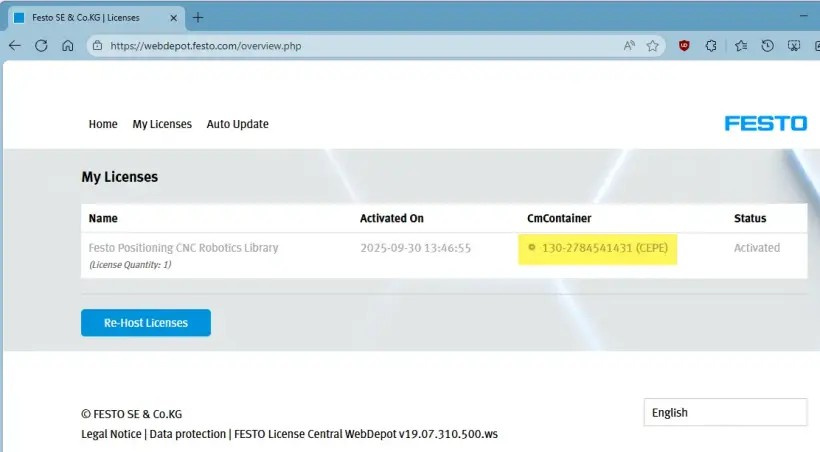
Wählen Sie die Lizenz aus und fahren Sie fort mit „File-based license transfer”.
Auf dieser Seite wird eine Fehlermeldung angezeigt, da der richtige CmContainer auf Ihrem PC nicht gefunden wurde.
Wir fahren daher mit der dateibasierten Lizenzübertragung fort.
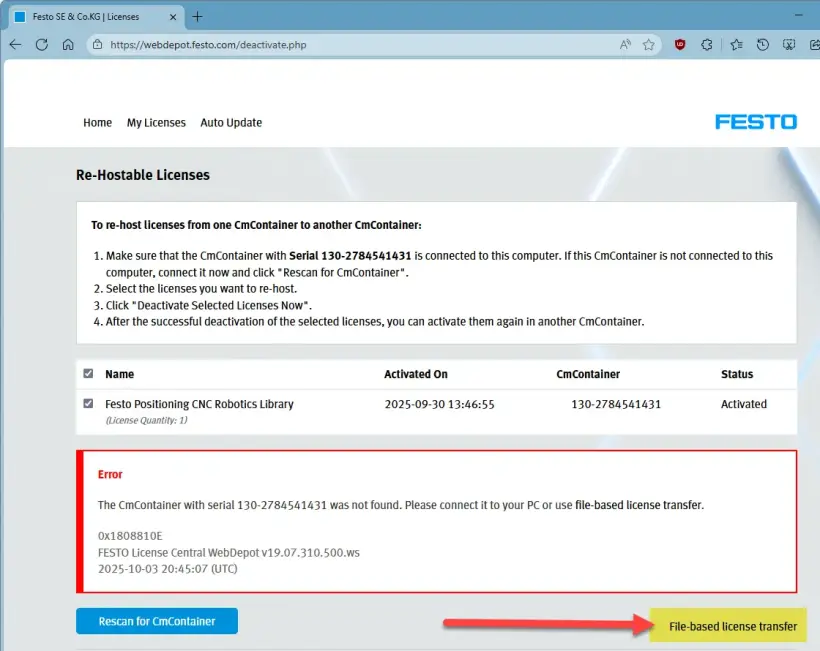
Bleiben Sie auf diesem Bildschirm und fahren Sie auf der CEPE-Seite fort.
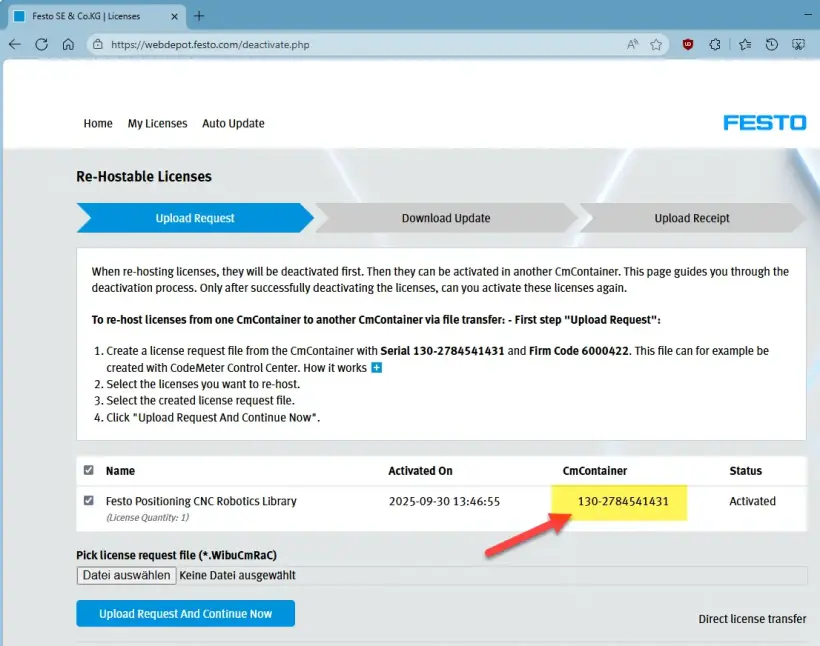
3. Laden Sie WibuCmRaC von der SPS herunter.
Überprüfen Sie den Namen des Lizenzcontainers anhand des entsprechenden Firmencodes -> Für FPosCR sollte der Container mit dem Firmencode 6000422 verwendet werden.
Überprüfen Sie die korrekte Lizenz-Containernummer (CmContainer).
Gehen Sie zu „Offline Activation“, wählen Sie den richtigen Container (Lizenzgeber) und das richtige Dateiformat aus und klicken Sie auf „Start Offline Activation“.
Laden Sie die WibuCmRaC Datei auf Ihren PC herunter und klicken Sie auf „Next“.
4. Laden Sie WibuCmRaC in das WebDepot.
Gehen Sie zu WebDepot, wählen Sie die WibuCmRaC aus und starten Sie das Re-Hosting, indem Sie auf „Upload Request And Continue Now“ klicken.
5. Laden Sie die aktualisierte Version von WibuCmRaU auf Ihren Computer herunter.
Laden Sie nach der Aktivierung die WibuCmRaU Datei auf Ihren PC herunter und klicken Sie auf „Next“.
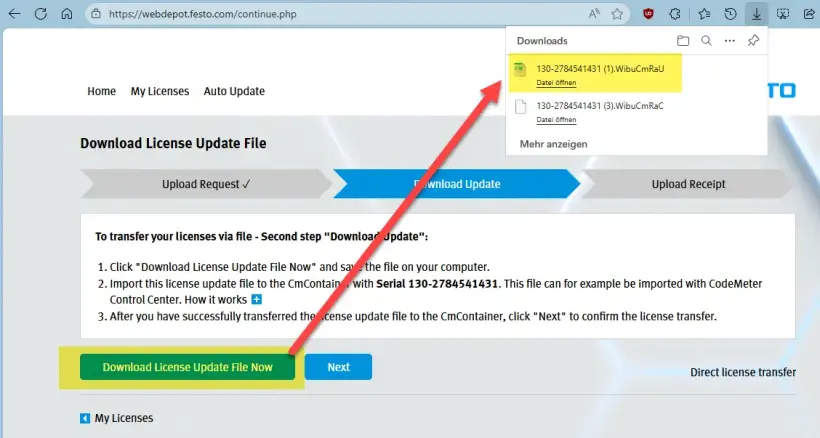
Bleiben Sie auf dieser Seite.
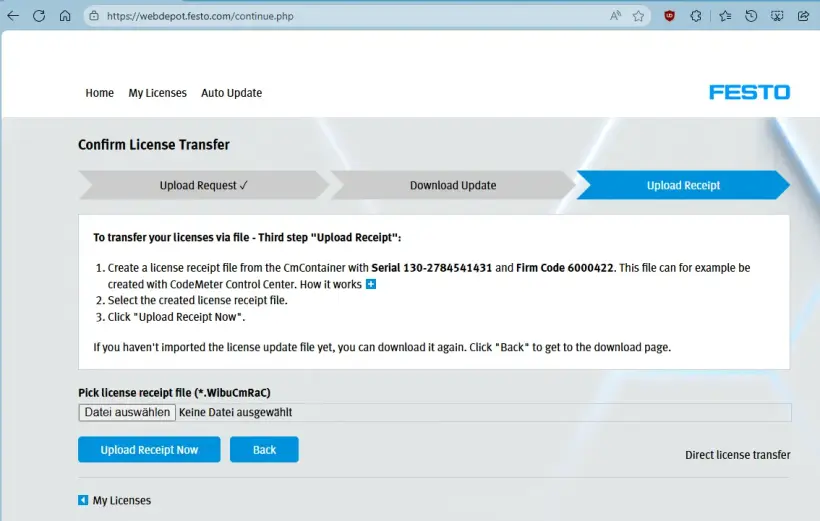
6. Laden Sie die WibuCmRaU auf die SPS.
Wählen Sie die WibuCmRaU Datei aus.
Wenn der Upload abgeschlossen ist -> Klicken Sie auf „Next“
7. Laden Sie den Beleg WibuCmRaR von der SPS auf Ihren PC.
Laden Sie die Belegdatei herunter -> Klicken Sie auf „Finish“.
8. Laden Sie den Beleg WibuCmRaR in WebDepot hoch.
Laden Sie die WibuCmRaR in das WebDepot.
Der Aktivierungsprozess ist abgeschlossen.
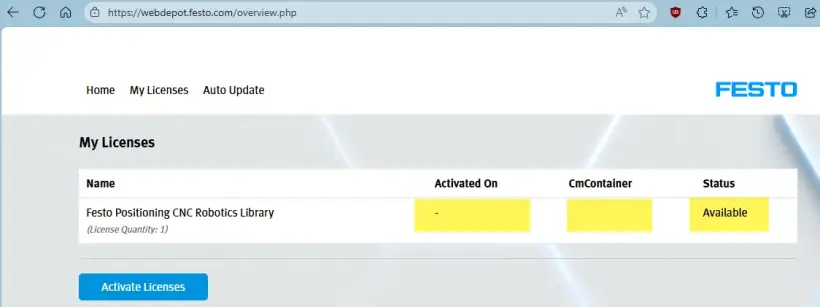
9. Überprüfen Sie das Ergebnis der Aktivierung.
Überprüfen Sie die Lizenz auf CEPC wbm.
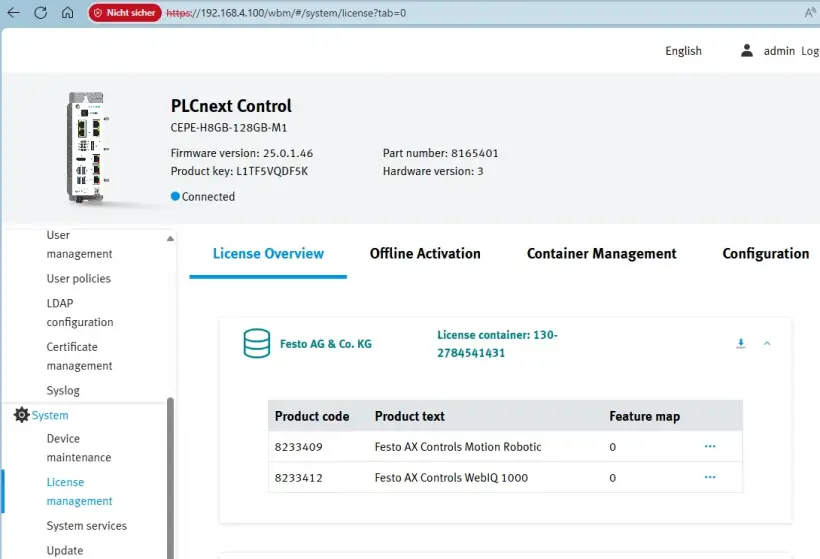
Der DEMO-MODUS oben rechts ist auf dem FPosCR deaktiviert.
So aktivieren Sie Ihre AX Industrial App-Lizenz
Aktivieren Sie Ihre AX Industrial Apps-Lizenz.
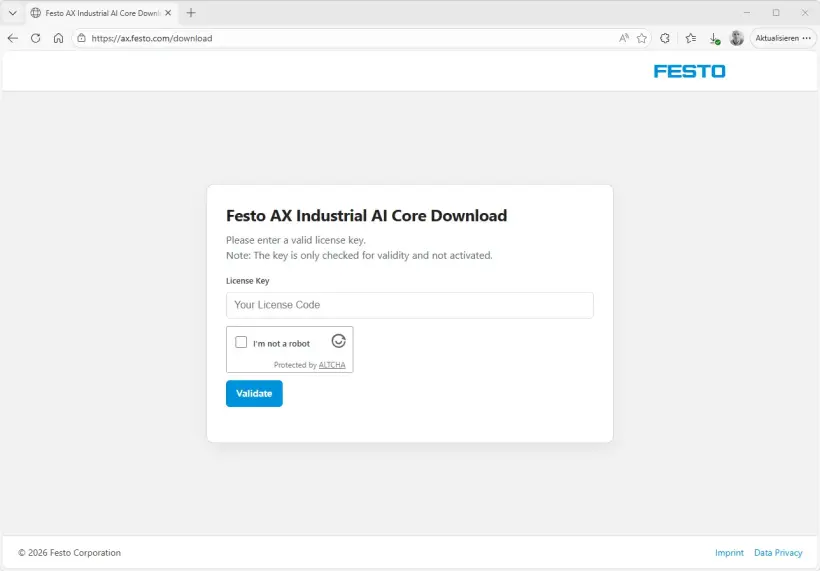
1. Laden Sie die Installationsdateien für den Festo AX Industrial AI Core herunter.
- Gehen Sie zu https://ax.festo.com/download
- Geben Sie den Lizenzschlüssel ein.
- Ihr Installationspaket wird erstellt.
- Laden Sie es herunter und entpacken sie es.
- Befolgen Sie die Anweisungen in der Datei „readme.txt“ und im „Application Note“.
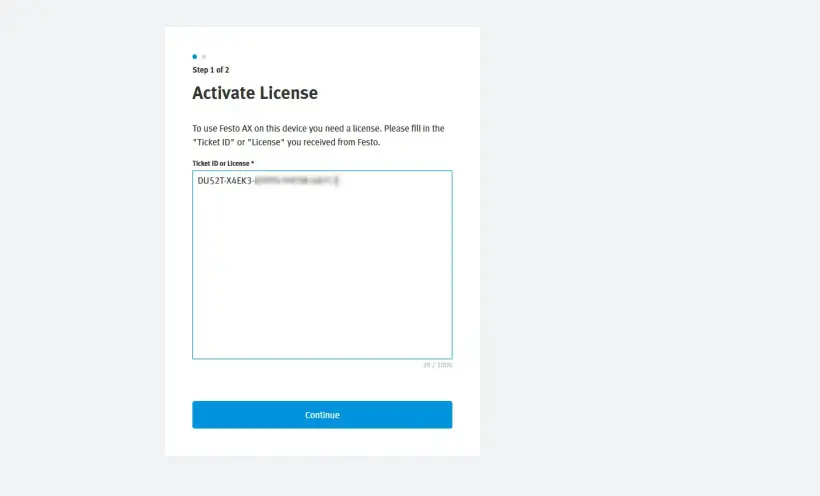
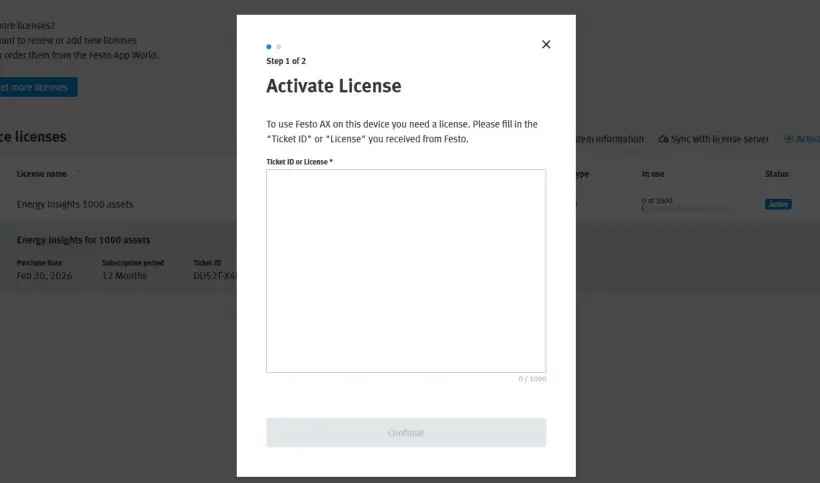
2. Beim Start ist eine Lizenz erforderlich, um die App zu aktivieren. Geben Sie den Lizenzschlüssel ein, den Sie per E-Mail von Festo erhalten haben.
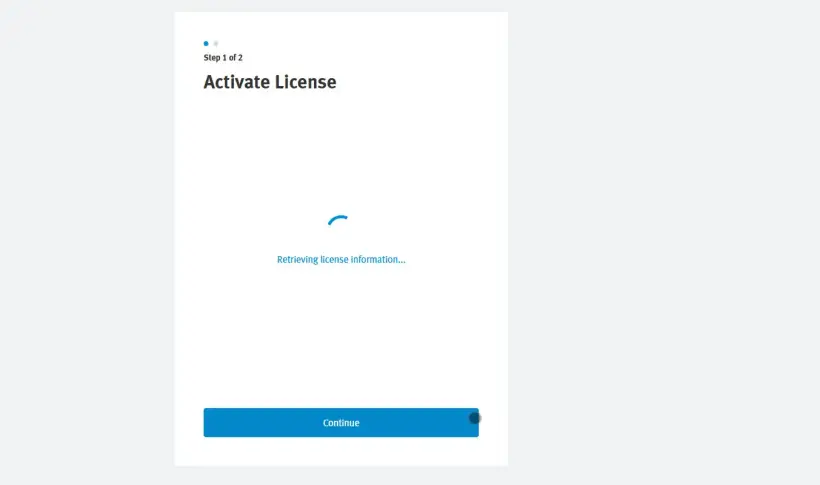
3. Die Lizenzinformationen werden vom zentralen Server abgerufen, daher ist eine Internetverbindung erforderlich.
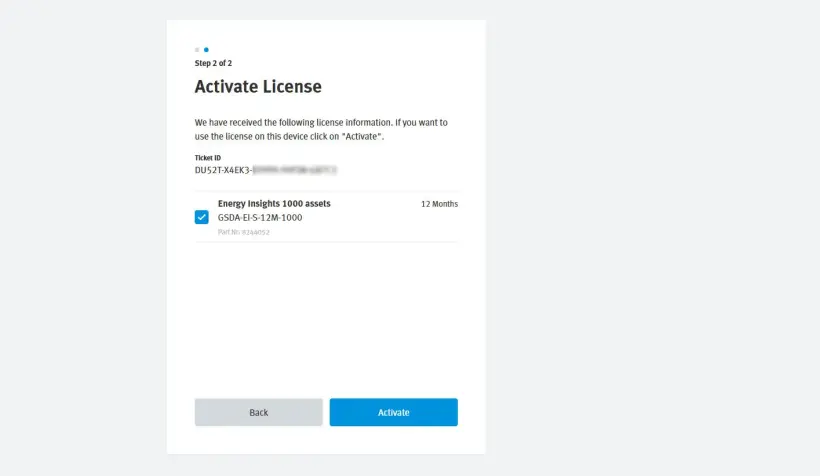
4. Wählen Sie die Lizenzen aus, die Sie auf diesem Gerät/dieser AX-Instanz aktivieren möchten, und klicken Sie auf „Activate“.
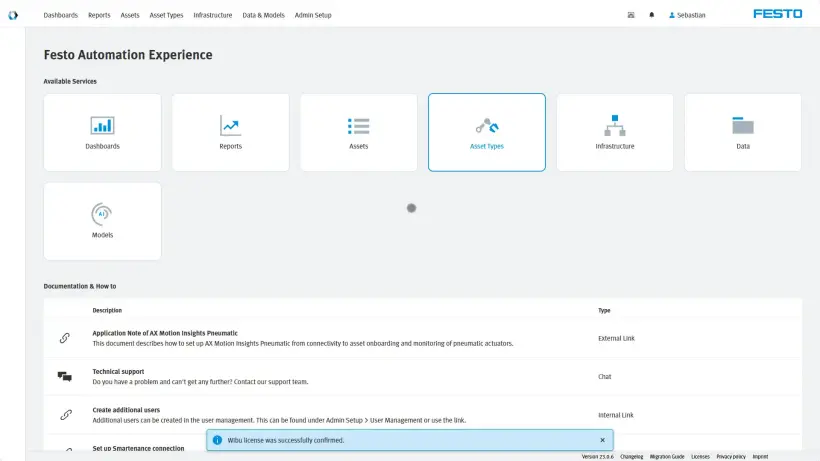
5. Die Lizenz ist aktiviert. Für diesen Handshake ist eine Internetverbindung erforderlich.
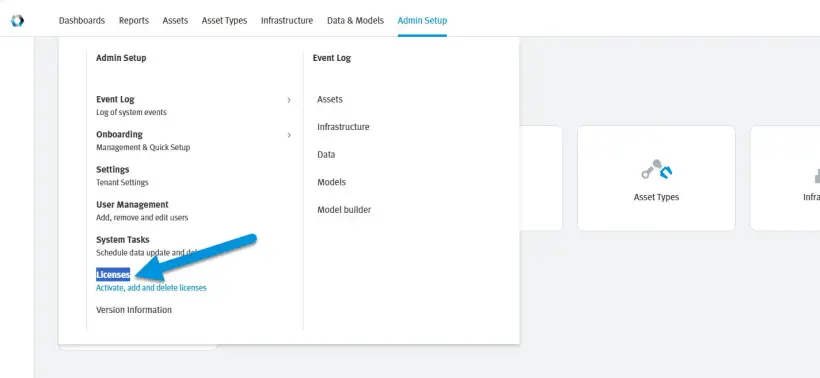
6. Um einen Überblick über alle Lizenzen zu erhalten, gehen Sie zu „Admin Setup“ > „Licenses“
7. Sie erhalten einen Überblick über alle aktivierten Lizenzen und deren Nutzung. Außerdem können Sie auf dieser Seite weitere Lizenzen aktivieren und Lizenzen deaktivieren, indem Sie auf das „ד klicken.
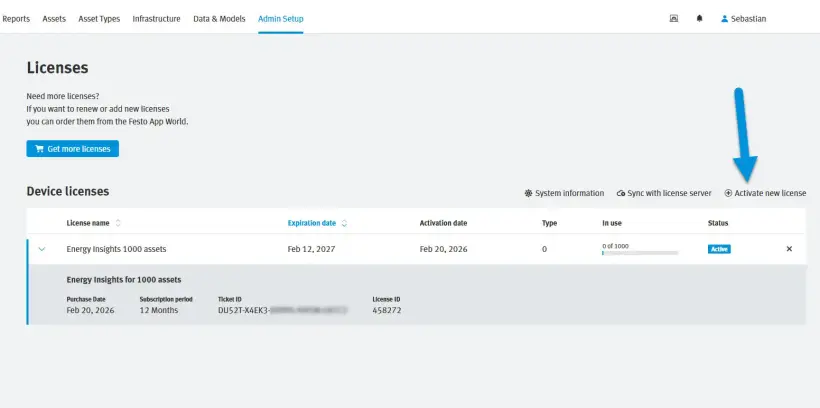
8. Um eine weitere Lizenz zu aktivieren, fügen Sie den Lizenzschlüssel ein und fahren Sie wie oben beschrieben fort.
So aktivieren Sie Ihre AX Smartenance Lizenz
AX Smartenance-Konto erstellen
1. Gehen Sie zu
2. Bitte füllen Sie alle erforderlichen Felder der Registrierung aus.
3. Akzeptieren Sie Captcha.
4. Klicken Sie auf „Send“.
5. Sobald Sie sich registriert haben, erhalten Sie eine E-Mail, mit der Sie die Einrichtung Ihres Kontos abschließen können. Falls Sie die E-Mail nicht erhalten haben, überprüfen Sie bitte Ihren Spam-Ordner.
6. Melden Sie sich mit Ihren Zugangsdaten an bei
Aktivieren Sie Ihre AX Smartenance-Lizenz.
1. Nach der Anmeldung wird die Lizenzübersicht angezeigt.
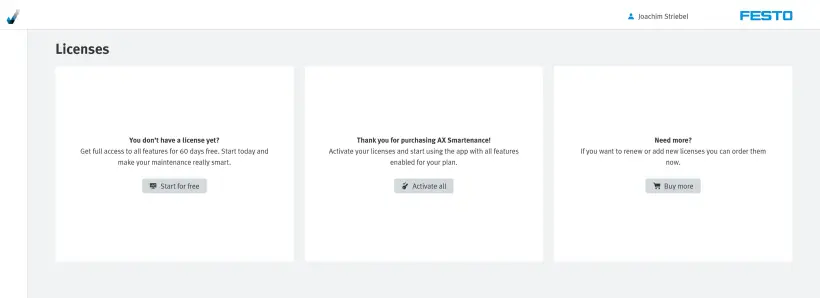
2. Wählen Sie „Activate all“, wenn Sie bereits einen gültigen Lizenzschlüssel erhalten haben.
3. Geben Sie den Lizenzschlüssel ein, den Sie von Festo erhalten haben.
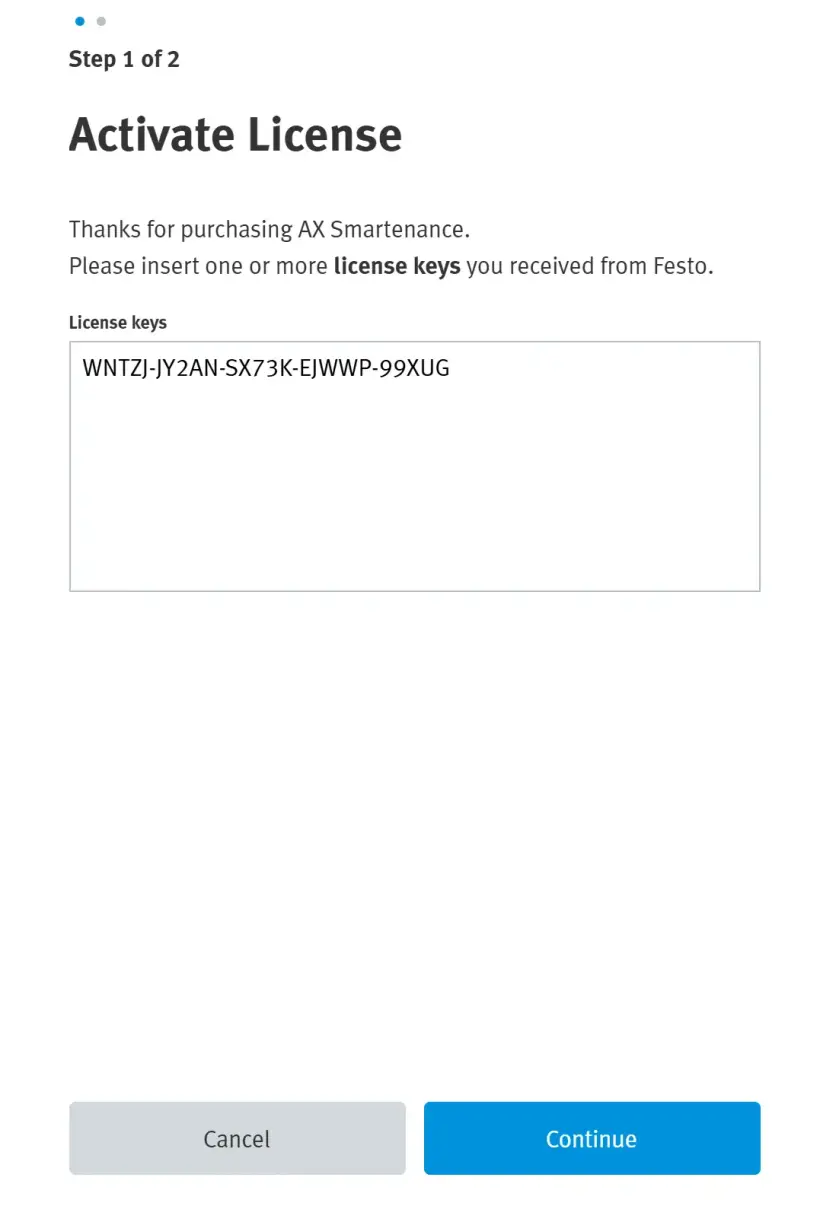
- Wählen Sie „Continue“.
- Die Überprüfung des Lizenzschlüssels war erfolgreich.
4. Wählen Sie Ihre Lizenzen zur Aktivierung aus.
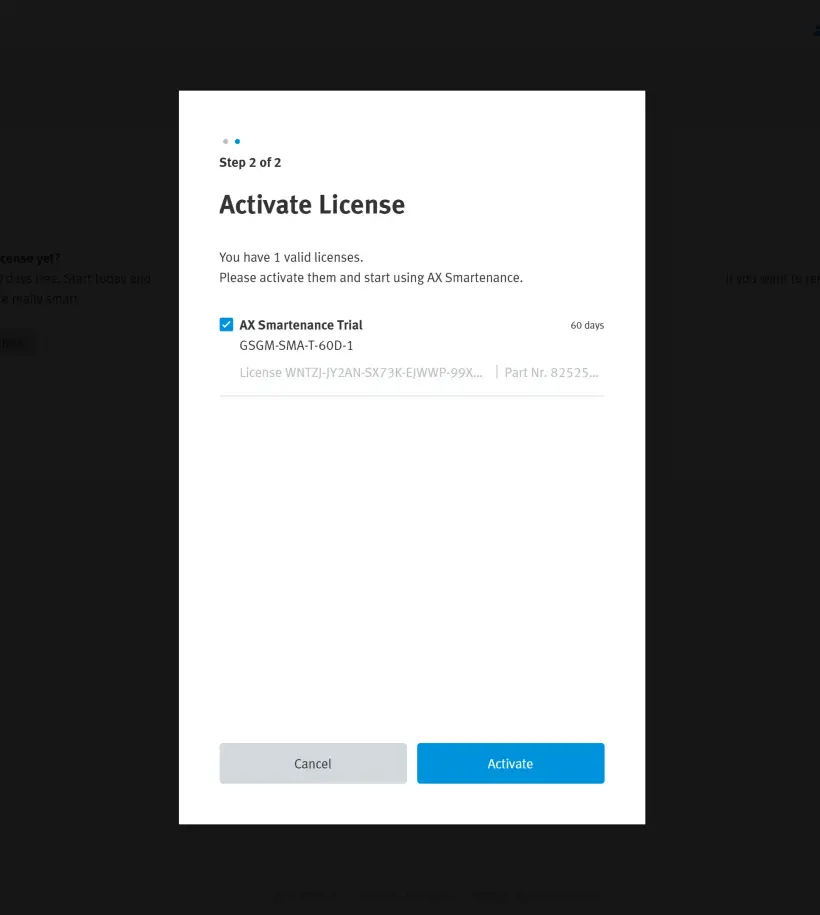
- Wählen Sie „Activate“.
- Die Aktivierung war erfolgreich.
5. Sie erhalten einen Überblick über alle aktivierten Lizenzen.